

Workflow Tools Enhancements
This month, we introduced enhancements focused on improving candidate readiness, platform stability, and scheduling reliability.🆕 Feature
1. System Check Embedded in Candidate Emails Description: Candidates now see a device and connectivity check prompt embedded directly below the CTA in their Talview emails, guiding them to verify their system setup before an interview or assessment. What’s New- System check prompt rendered below the primary CTA in all candidate email templates.
- Covers browser compatibility, camera, microphone, and network checks.
- No action required from Recruiters - applies automatically to all outgoing emails.
🐞 Bug Fixes
- Workflow Tools - Platform Stability
- Evaluator reminder emails not triggering for pending evaluations.
- Candidate invitation emails failing to send after an invite action.
- New notifications not appearing without a page refresh, now appear in real time.
- Unified assessment steps incorrectly marked as “Completed” after the first section.
- Ivy AI total score displaying as 0 in the score side panel.
- Proview index not visible in tabular view and side panel.
- Candidate list not loading for Evaluators.
- Time slab display breaking for slots ending at 12:00 AM.
- Scheduler - Payment, Booking & Notification
- Sessions scheduled despite failed payments.
- Candidates unable to retry after a failed transaction.
- Incorrect redirect from the payment gateway back button.
- Sessions incorrectly scheduled 14 days out.
- Slots not appearing when refreshing the booking page mid-flow.
- Slots incorrectly marked as holidays when another interviewer was available.
- Reminder emails incorrectly triggering for Intelligent Scheduling users.
Proctoring Updates
This month, we introduced enhancements focused on improved session management, candidate-level actions, and LMS integration upgrades.Attendee Experience (V8)
⚙️ Enhancements
1️⃣ ID Verification EnhancementsDescription: Improved ID verification now checks for document expiry, date-of-birth anomalies, and validates that the captured ID matches the intended document. 2️⃣ Consent Data Shown Based on Configurations
Description: The consent page now shows only relevant Terms and Conditions content based on what is configured, ensuring candidates see accurate information when camera and screen sharing are disabled.
🐞 Bug Fixes
- Disabling microphone was also disabling camera permissions.
- Incidents not triggering consistently.
- Floating widget overlapping exam MCQ sections.
- Camera and audio monitored after session completion.
Center Management (V8)
🆕 Features
1. Suspend a Candidate’s SessionDescription: Proctors can now terminate a candidate’s session directly from the monitoring dashboard when a serious violation is detected. What’s New
- A reason for suspension must be selected before confirming.
- The candidate is immediately shown a session terminated screen upon suspension.
Description: Proctors can now add internal notes to a candidate’s session at any point during onboarding or the exam. What’s New
- Notes can be added using the “Add Note” option in the dock.
- Notes are visible only to the proctor and their organisation and can be referenced when reviewing completed sessions.
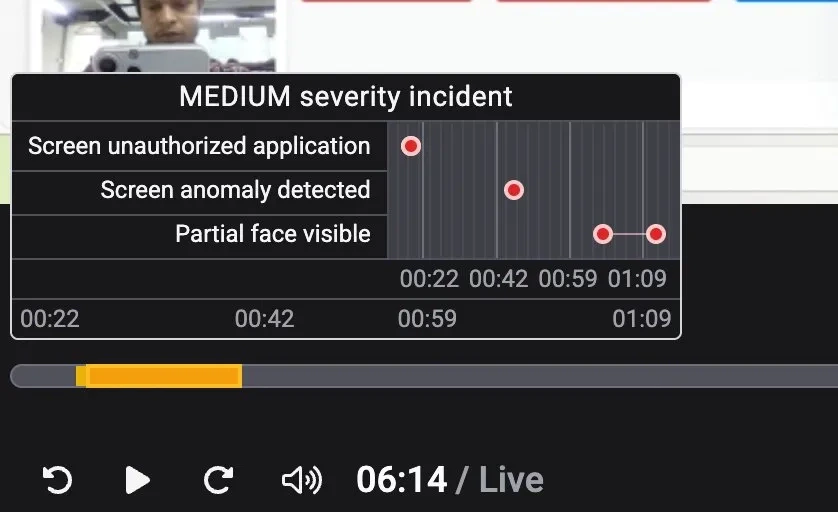
Description: Hovering over an incident marker on the session timeline now reveals a pop-up showing all flagged events grouped to form that incident. What’s New
- Pop-up shows all events flagged and grouped to form that incident, along with their individual timestamps.
- Helps proctors and reviewers quickly understand what occurred during a suspicious moment without scrubbing through the recording.
Description: Center admins can now click on any candidate in the candidate list to view a detailed profile of that candidate’s session. What’s New
- Shows registration details, check-in information, and captured submissions with match and mismatch indicators.
- Displays a chronological timeline of key events including incidents and exam milestones.
Description: Center admins can now take candidate-level actions directly from the console. What’s New
- Report Incident: Center admins can report an incident against a candidate with a description and action taken.
- Mark Absent: Center admins can mark a candidate as absent when they fail to show up for their exam.
- Decline Booking: Center admins can decline a candidate’s exam booking before they have appeared for the exam.
⚙️ Enhancements
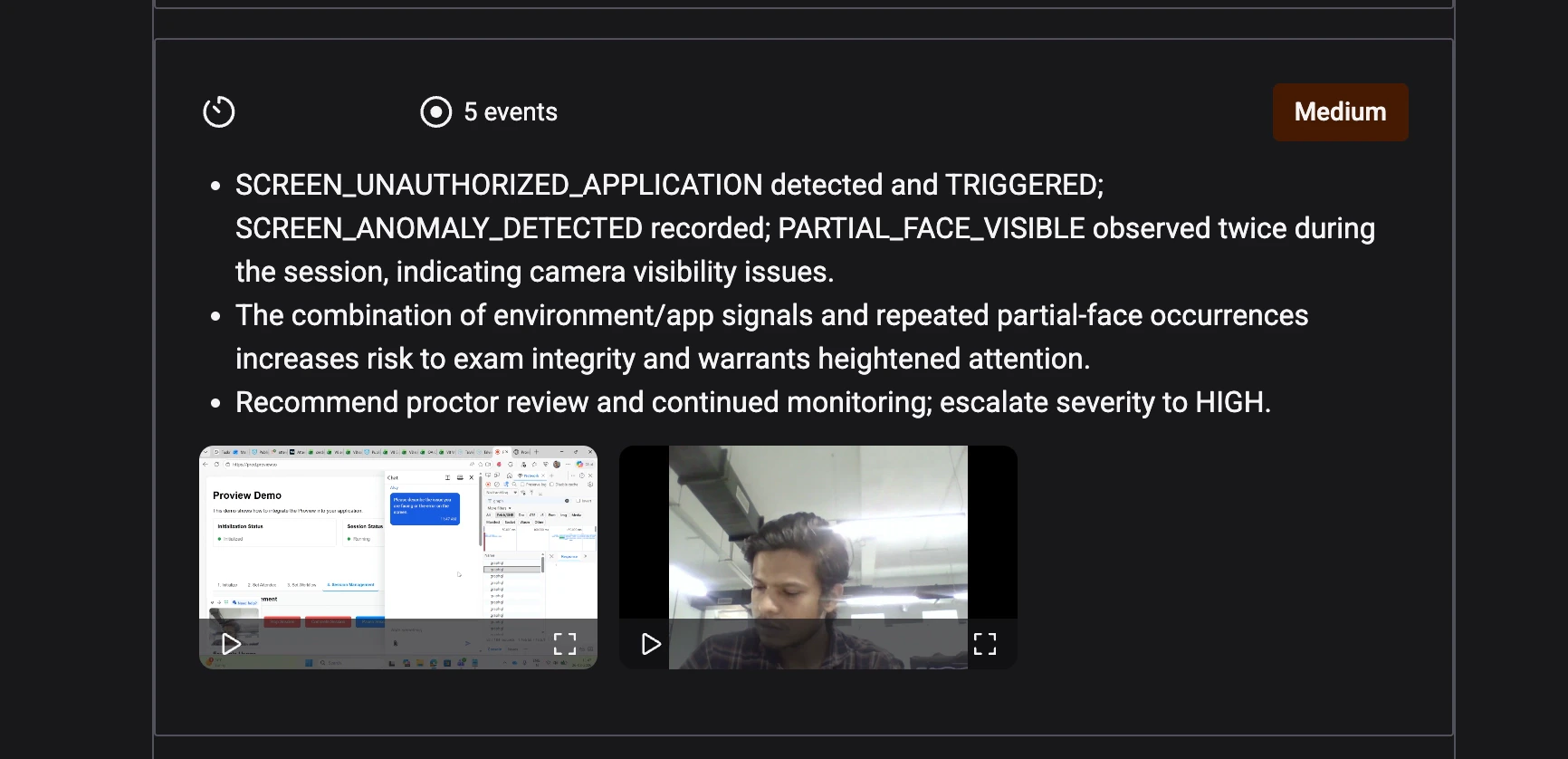
1️⃣ Video Evidence for Incidents in Summary ReportDescription: Each incident in the session summary report now includes video evidence captured at the time of the incident. What’s New
- Reviewers can watch relevant video clips directly within the report.
- Makes it easier to assess incidents without scrubbing through the full session recording.
🐞 Bug Fixes
- Clicking within an incident region always jumped to the start - now seeks to the exact point clicked.
Integrations (V7+)
🆕 Feature
Upgraded Moodle LMS to Version 5.1Description: Talview now supports Moodle version 5.1, with all proctoring types and secure browser capabilities.
Interview Rooms Enhancements
This month, we introduced enhancements focused on improving code execution reliability, session recording, and session stability.⚙️ Enhancements
1️⃣ CodeJam - Migrated to Judge0 Execution EngineDescription: CodeJam code execution now runs on Judge0, replacing the previous JDoodle integration for more reliable and faster results. 2️⃣ VR Session Recording Report
Description: A dedicated recording report is now available for Video Room sessions.
🐞 Bug Fixes
- Face auth image corrupted in playback, causing incorrect verification status.
- Face auth image broken after completing a live session.
- Candidates stuck on loading screen after face authentication.
- Interviewers intermittently unable to join live sessions.
- CodeJam sync broken for ACS sessions.
- Post-session feedback page stuck loading after leaving a session.
- Incorrect authentication URL redirect when joining a live session.
- Secondary camera feed not visible in portrait mode.
Assessment Engine & Candidate Experience Updates
This month, we focused on improving the accuracy and reliability of candidate-facing communications.⚙️ Enhancements
1️⃣ Cleaner Assessment EmailsDescription: The “Estimated Duration” field no longer appears in assessment invite and reminder emails when no duration value is configured, ensuring candidates receive accurate communications.