

🛠️ Workflow Tools Enhancements
Ivy Playback View with Scores
Evaluators can now review candidate responses and scores within a unified Ivy Playback interface. This includes:- Seamless playback of candidate recordings
- Inline scoring fields
- Streamlined navigation for faster evaluations
Ivy Summary View
Recruiters and hiring managers can now see AI-generated summaries of Ivy interviews, highlighting:- Key conversation themes
- Candidate strengths
- Areas for improvement
Public Registration Workflows
Recruiters can now:- Open workflows for public candidate registration via a unique link or QR code
- Close or reopen registrations anytime to manage volume and control flow
📲 Scheduling Enhancements
Guest Interviewer Scheduling (Whitelisted Domains)
Recruiters can now schedule interviews with external evaluators using approved domains. Features include:- Auto-creation of guest profiles
- Calendar invites with secure access
- View of candidate profiles and comment-based evaluations
Automated Scheduler Selection
When using Intelligent Scheduler:- “Notify Everyone” enabled → triggers intelligent notifications to all participants
- Disabled → defaults to regular scheduler (no alerts)
Resume Access in Scheduling Emails
Evaluators can now view candidate resumes directly from interview invite emails, improving pre-interview preparation without needing platform logins. Check it out below:🧑💼 Interview Rooms Enhancements
Auto-Trigger 360° Environment Scan + Secondary Camera [Alpha]
- Auto-launch of candidate verification steps (360° scan + secondary camera)
- Improves session readiness and reduces setup delays
Integrated Evaluation in Interview Rooms [Alpha]
- Evaluations can now be tracked directly in Interview Rooms for interviews scheduled via Workflow Tools
- Enables consistent feedback capture without switching tools
📊 Assessment Engine Updates
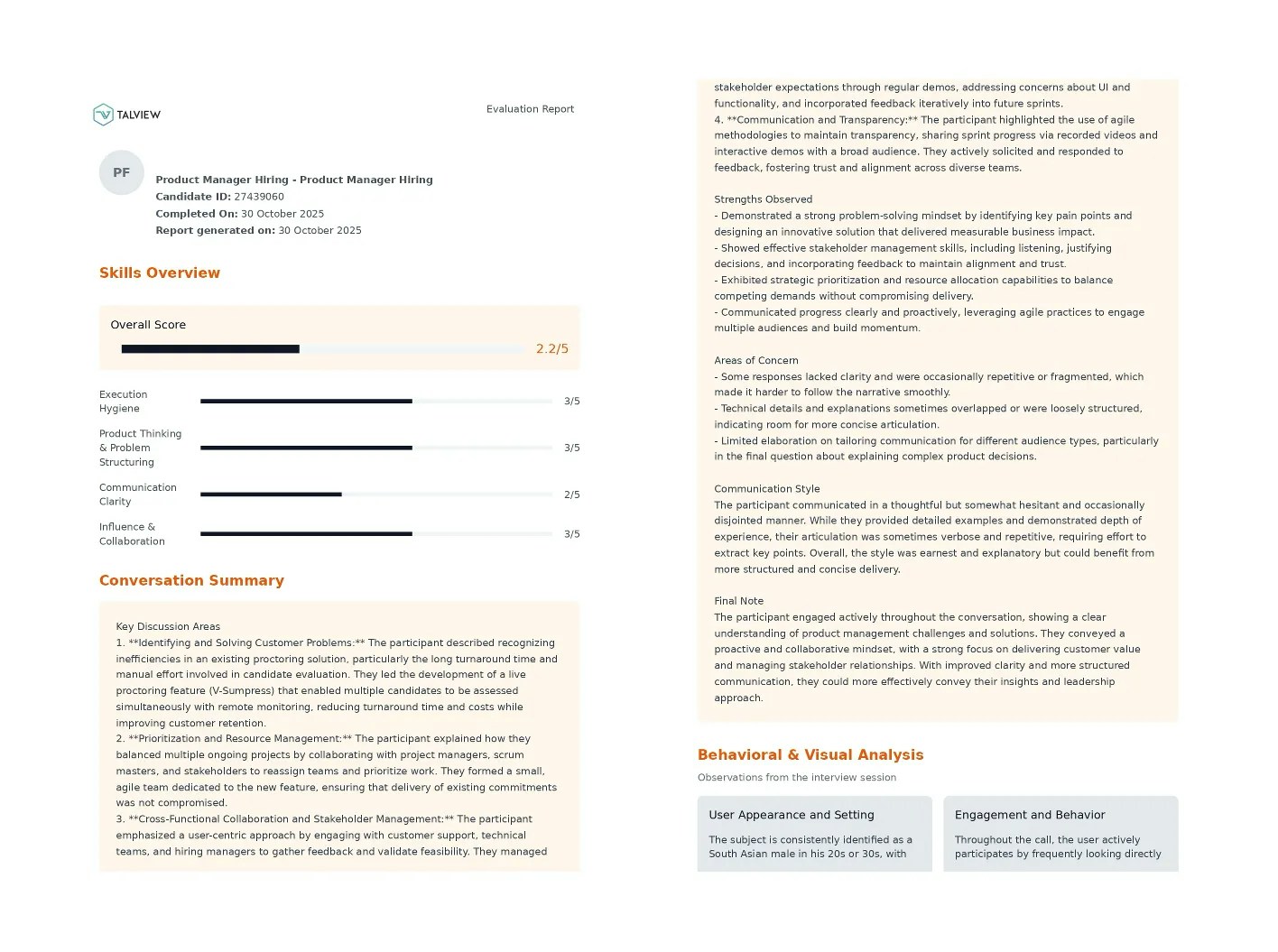
Ivy Report Enhancements
The Ivy Report now includes:- AI-generated conversation summary
- Candidate strengths, concerns, and communication style
- Final evaluation notes
🔐 Proctoring Enhancements
Secure Browser Blocklist Updates
New applications added to the blocklist:- Windows: TechSmith Relay Recorder
- macOS: Camtasia, Icecream Screen Recorder
.png?fit=max&auto=format&n=UBOM0OIh6aSg8VNT&q=85&s=cea53c74c0b0001b693ee78499e36f18)
⚙️ LMS Integrations (Browser Extension v1.5.0)
Totara LMS Integration with Proctoring
Proview Proctoring is now fully integrated with Totara LMS:- Configure proctoring for SCORM
- View session recordings
- Candidates can attempt proctored SCORM packages
Moodle LMS 4.5 – Secure Browser Support
Coordinators can now enable Secure Browser for quizzes without selecting a proctoring type in Moodle 4.5.AU Region Support for Browser Extension
Proview browser extension now supports Australia (AU) region deployments, enabling use for partners like La Trobe University.🧾 Payment Enhancements
Invoice Updates
Invoices now include the company name in billing details, simplifying reimbursement processes for candidates.Thanks for reading the October 2025 release notes!