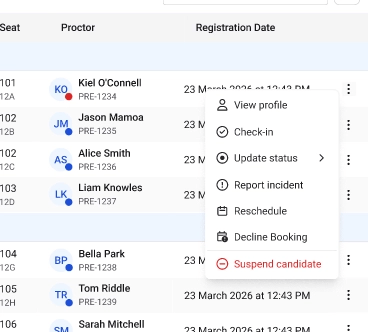
Sometimes due to operational issues, duplicate bookings, or candidate requests Center administrators can submit a decline booking request so the exam coordinator can review and reassign the booking and/or reschedule the bookingThis article explains how to submit a decline booking request for a candidate from the Candidates tab.
Follow these steps to decline a candidate booking.1. Open the Candidates tabNavigate to the Candidates tab within the center workflow.This page displays the list of candidates scheduled to take exams at the center, along with details such as exam slot, status, and assigned room.2. Locate the candidate bookingScroll through the candidate list or use available filters to find the candidate whose booking needs to be declined.Each row represents a candidate booking associated with a specific exam slot.3. Open the candidate action menuOn the right side of the candidate row, click the menu to view the available actions.4. Select the Decline booking optionFrom the action menu, click Decline booking.This opens the Decline booking request panel.5. Select the reason for declining the bookingFrom the Reason dropdown, choose the most appropriate reason for declining the booking.Common reasons include:
Technical issue at center
Center operational issue
Other (with optional remarks)
6. Add remarks (optional)If additional explanation is required, enter details in the Remarks field to provide context for the request.7. Confirm the decline requestClick Confirm decline request to send the request to the exam coordinator for review.Once submitted, the booking remains active until the exam coordinator reviews and approves the request.
Additional Tips
Declining a booking does not cancel the candidate’s slot but the slot will no longer be tagged to them
Provide clear remarks when selecting Other as the reason.
Decline requests cannot be submitted if the candidate’s exam status is In Progress or Completed.
If the request is approved, the candidate will be removed from the slot and the slot capacity will increase.