> ## Documentation Index
> Fetch the complete documentation index at: https://docs.talview.com/llms.txt
> Use this file to discover all available pages before exploring further.
# September 2026 Release Updates
The September 2026 release delivers enhancements across **Workflow Tools, Interview Rooms, Proctoring, Assessment Engine & Candidate Experience, and Admin**, introducing bulk candidate actions, automated resume fitment, new exam creation tools, expanded assessment provider support, and improved form reliability.
***
### Workflow Tools Enhancements
This month, we introduced enhancements focused on **bulk candidate actions, automated resume fitment, and smarter workflow automation rules**.
#### 🆕 Features
**1️⃣ Bulk Actions**
**Description:** Recruiters can now act on multiple candidates at once from an action dock at the bottom of the candidate list.
**What's New**
* Action dock appears as soon as candidates are selected, showing the number selected.
* Step-specific actions: Invite and Schedule on the All tab; Change Status and Assign Evaluator on Screening and Assessment; Schedule, Change Status, Assign Evaluator, and Cancel Interview on Interview.
* Assign multiple evaluators to multiple candidates in one go, with a summary of assigned, already assigned, and failed.
* Cancel Interview with one cancellation reason applied to all selected interviews.
* Bulk actions also available from the command palette.
**2️⃣ Resume Fitment Criteria Auto-Generated from Job Description**
**Description:** When a workflow is created with a job description, Essential, Preferred, and Optional fitment criteria are now generated automatically and pre-filled on the Resume Fitment configuration tab for recruiter review.
**What's New**
* Essential, Preferred, and Optional criteria auto-generated from the job description at workflow creation.
* All three criteria tiers pre-filled on the Resume Fitment configuration tab.
**3️⃣ New Workflow Automation Rules**
**Description:** Recruiters can now automate candidate progression and status updates based on Resume Fitment results, evaluator recommendations, and inactivity.
**What's New**
* Resume Fitment progression at Screening: Strong Fit sets Selected, Potential Fit sets a recruiter-configured status, Low Fit sets Turned Down. Strong and Potential Fit can optionally move the candidate to the next step.
* Evaluation status bubble-up: when an evaluator submits a recommendation, the candidate's step status updates automatically across Screening, Assessment, and Interview steps.
* Inactive candidate handling: candidates still Invited or In Progress after invite expiry are moved automatically to Turned Down, Hold, or a recruiter-configured status.
***
#### 🐞 Bug Fixes
**Workflow Tools: Candidate Lists, Evaluation & Workflow Setup**
* Additional fields not appearing in filters and search on workflow and candidate lists.
* Proctoring index label showing incorrectly between V7 and V8 proctoring.
* Kebab menu, side panel display, and external ID issues across candidate views.
* Search showing empty state for full email and Experience filter not clearable.
* All view showing generic "Interview" instead of configured step names.
* Missing Evaluator Name, External ID, and Recommendation columns in Assessment export.
**Notifications & Screening: Automation, Invite & Notification Fixes**
* Evaluation-based status automation not updating candidate step status.
* Candidate invitation failing after bulk resume parsing with missing organization.
* Workflow creation failing when required templates are missing.
* Notification Inbox status filter showing previously selected data.
* Calendar replies failing for some response types and spelling error in interview cancellation email.
***
### Proctoring Updates
This month, we introduced enhancements focused on **new exam creation tools, enrollment management, and improved session review capabilities**.
#### Attendee Experience
#### 🐞 Bug Fixes
* Candidates no longer see a generic error when another app is already using their camera or microphone.
* Fixed candidates getting stuck on the face capture page with no camera feed.
* Fixed the fallback video stream for face capture not passing through correctly.
* Primary and secondary devices no longer disconnect after a short network interruption.
* Fixed the Help Center article viewer crashing when an article contains an unsupported content block.
***
#### Proctor/Center Management (V8)
#### ⚙️ Enhancements
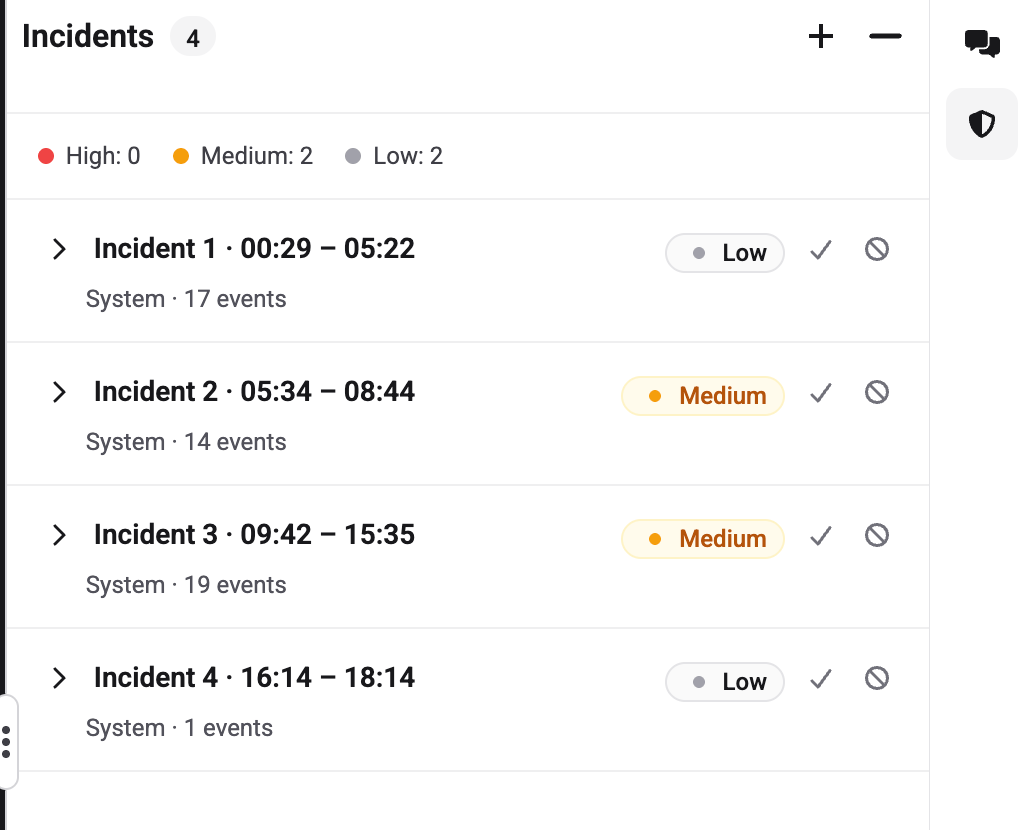
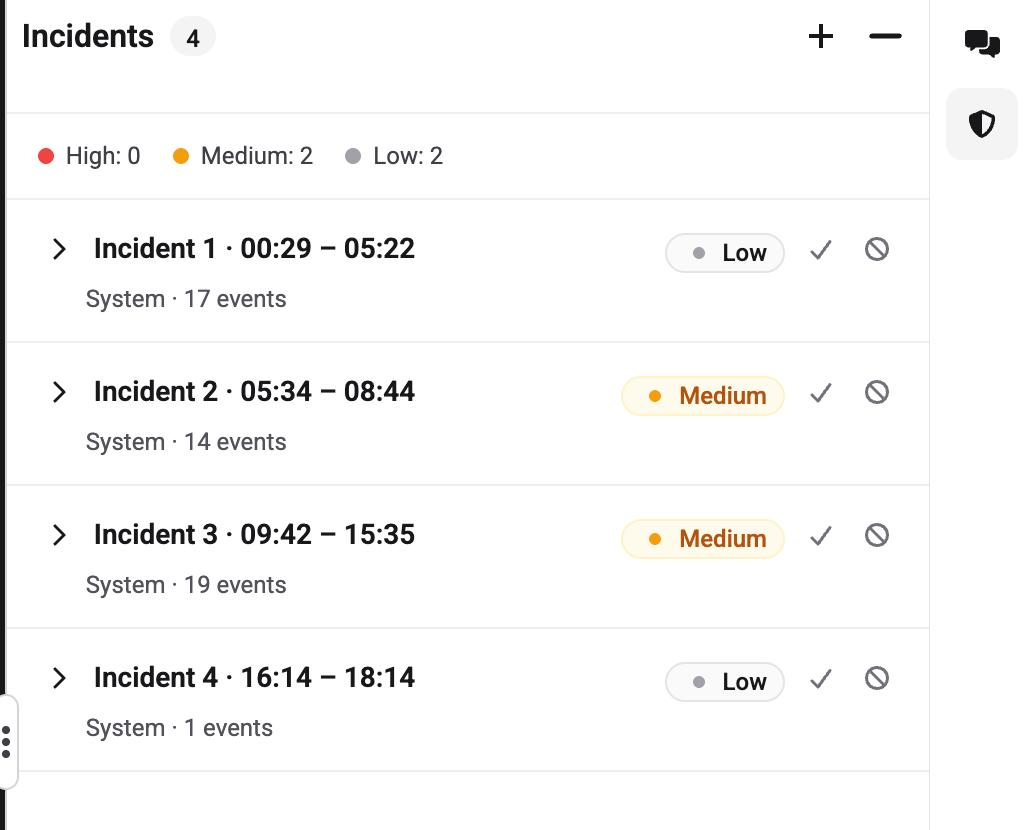
1️⃣ **Clearer Incident Identification**
Incidents are now labeled with a sequential number and time range (e.g., "Incident 1 · 02:19–07:29") instead of being named after the first detected event.
 2️⃣ **Duplicate Incident Prevention**
When reporting a new incident manually, the system now checks whether the specified timestamp falls within an existing incident's time window and prompts the reviewer to add their observation as an event instead.
 #### 🐞 Bug Fixes
* Fixed incorrect verification statuses, mismatched ID images, statuses not refreshing, and missing timestamps in the checks pane.
* Fixed missing device information, incorrect browser details, and layout issues in the System Overview pane.
* Fixed candidate connection status not updating accurately on tiles.
* Fixed candidate tiles getting stuck in a loading state after disconnection or reconnection.
* Fixed messages sent to candidates being delivered multiple times.
* Fixed wait time not tracking correctly during and after sessions.
* Fixed the monitoring dashboard showing empty panes immediately after login.
***
#### Proview Console (V8)
#### 🆕 Features
1️⃣ **New Exam Creation Templates**
**Description:** Eight exam creation templates are now available across Assessment, AI Proctoring, and Proctor Reviewed options.
**What's New**
* Templates span Assessment / Enrollment + Assessment, AI Proctoring / Proctor Reviewed, and Invite-based Window / Fixed Window combinations.
* Each template includes helper text explaining how it works.
* Proctor Reviewed templates automatically create a Drive for live monitoring and recorded review.
2️⃣ **Center Templates & Room-Type Based Scheduling**
**Description:** Two center templates are now available for different proctoring setups.
**What's New**
* Single Room template for post-session review with no scheduling required.
* Multi Room template for live proctored sessions with scheduling, room management, and candidate tracking.
3️⃣ **Approve Enrollment**
**Description:** Coordinators can now approve Invited or Registered candidates, moving them to Enrolled and granting exam access.
**What's New**
* Available individually or in bulk via "Approve Selected" with a confirmation modal.
4️⃣ **Face Verification in Candidate Timeline**
**Description:** Face capture is now shown in the candidate timeline with a dedicated face check section on the ID Verification side panel card.
***
#### ⚙️ Enhancements
1️⃣ **Exam Security Configurations**
#### 🐞 Bug Fixes
* Fixed incorrect verification statuses, mismatched ID images, statuses not refreshing, and missing timestamps in the checks pane.
* Fixed missing device information, incorrect browser details, and layout issues in the System Overview pane.
* Fixed candidate connection status not updating accurately on tiles.
* Fixed candidate tiles getting stuck in a loading state after disconnection or reconnection.
* Fixed messages sent to candidates being delivered multiple times.
* Fixed wait time not tracking correctly during and after sessions.
* Fixed the monitoring dashboard showing empty panes immediately after login.
***
#### Proview Console (V8)
#### 🆕 Features
1️⃣ **New Exam Creation Templates**
**Description:** Eight exam creation templates are now available across Assessment, AI Proctoring, and Proctor Reviewed options.
**What's New**
* Templates span Assessment / Enrollment + Assessment, AI Proctoring / Proctor Reviewed, and Invite-based Window / Fixed Window combinations.
* Each template includes helper text explaining how it works.
* Proctor Reviewed templates automatically create a Drive for live monitoring and recorded review.
2️⃣ **Center Templates & Room-Type Based Scheduling**
**Description:** Two center templates are now available for different proctoring setups.
**What's New**
* Single Room template for post-session review with no scheduling required.
* Multi Room template for live proctored sessions with scheduling, room management, and candidate tracking.
3️⃣ **Approve Enrollment**
**Description:** Coordinators can now approve Invited or Registered candidates, moving them to Enrolled and granting exam access.
**What's New**
* Available individually or in bulk via "Approve Selected" with a confirmation modal.
4️⃣ **Face Verification in Candidate Timeline**
**Description:** Face capture is now shown in the candidate timeline with a dedicated face check section on the ID Verification side panel card.
***
#### ⚙️ Enhancements
1️⃣ **Exam Security Configurations**
DOM recording (RRPlay) is now labeled in config and can be set when publishing a new version. Side panel has been restructured with copy and order updates. Email templates updated including certification email, certification exam invite, and a new guardian consent invite email.
***
#### 🐞 Bug Fixes
* Newly created flows being automatically set as default.
* Enrollment status not moving from Invited to Registered, including after IDV pass/fail.
* Guardian consent status not updating after consent and verification.
* ID verification display issues including rejected IDs showing "Matched" and missing IDV section for some candidates.
* Extended time from Extend Invite not reflected in the invitation email.
* Candidate invitations intermittently not appearing in the candidate list or not being delivered by email.
* Flow config versioning dropping the EP policy and guideline on publish.
* Slot rescheduling, cancellation sync, and playback association issues.
***
### Interview Rooms Updates
This month, we introduced enhancements focused on **improved transcription reliability and insights workflow stability**.
#### ⚙️ Enhancements
1️⃣ **Insights Workflow: Retry on ID Collision**
The insights workflow now retries correctly when an ID collision occurs during skill extraction, instead of failing the entire run permanently.
2️⃣ **Insights Workflow: Timeout Fixed**
The insights workflow child execution timeout has been corrected to match the activity retry budget.
3️⃣ **Transcription: File Size Issue Fixed**
Transcript generation workflows were failing for long MP4 recordings due to payload size. Chunking and payload size have been corrected.
4️⃣ **Transcription: Retrigger CLI Enhanced**
The retrigger transcription CLI now supports forced regeneration for sessions that already have a transcript ID, enabling correction of stale or incorrect transcripts.
5️⃣ **Email with Special Characters: Auth Fixed**
User emails containing special characters such as apostrophes are now recognised correctly during login.
***
#### 🐞 Bug Fixes
* Transcript and insights not being generated for interviews on the Talview hiring account.
* Twilio fallback not triggering and the "Join Interview" button stuck in loading after fallback.
***
### Assessment Engine & Candidate Experience Updates
This month, we focused on **client-specific provider accounts, improved question authoring, and candidate experience clarity**.
#### 🆕 Features
1️⃣ **Client-Specific Accounts for External Assessment Providers**
**Description:** Clients with their own agreement with an external assessment provider can now run invites and results through their own provider account instead of the shared Talview account.
**What's New**
* Available for iMocha, IKM, and Psymetrics.
* If a client has not set up their own account, assessments continue to use the Talview account as a fallback.
***
#### ⚙️ Improvements
**1️⃣ 1. Example Questions in the Bulk Import Template**
**Description:** The bulk import template now includes filled-in example rows for each question type, with an instruction row explaining the correct format.
**What's New**
* One example row each for multiple-choice, multiple-answer, long form, live interview, and video interview questions.
* Instruction row at the bottom explaining how to use the examples and the correct time format for video interview questions.
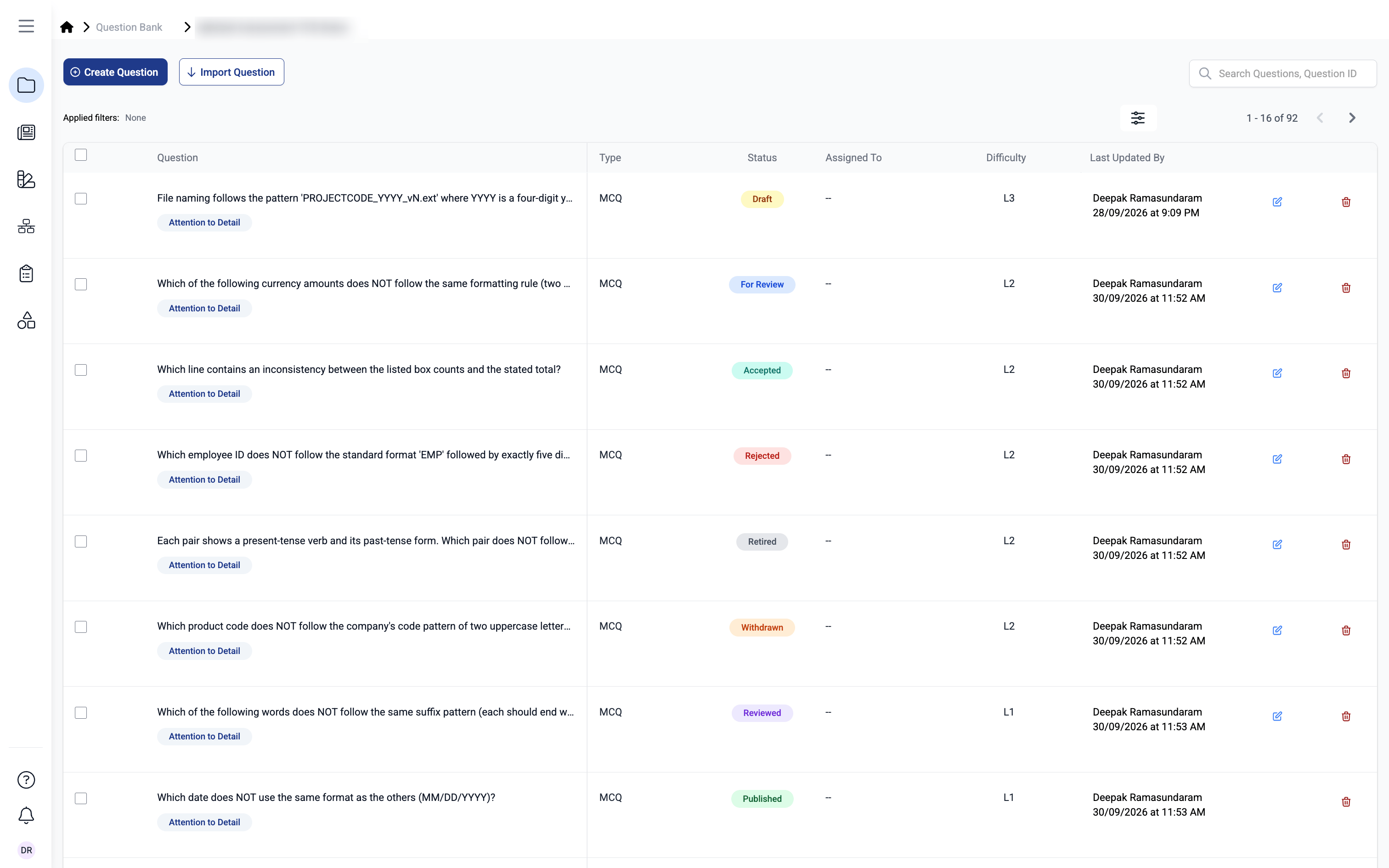
**2️⃣ Clearer Question Status Labels and Colors**
**Description:** Question statuses now have distinct colors and consistent labels across the Question Bank, Update Status window, and Question Overview.
**What's New**
* Each status has its own color: Draft (yellow), For Review (blue), Reviewed (purple), Accepted (teal), Rejected (red), Published (green), Retired (grey), and Withdrawn (orange).
* Same labels and colors appear consistently across all views.
* The Update Question Status window now includes guidance text explaining what you are selecting.
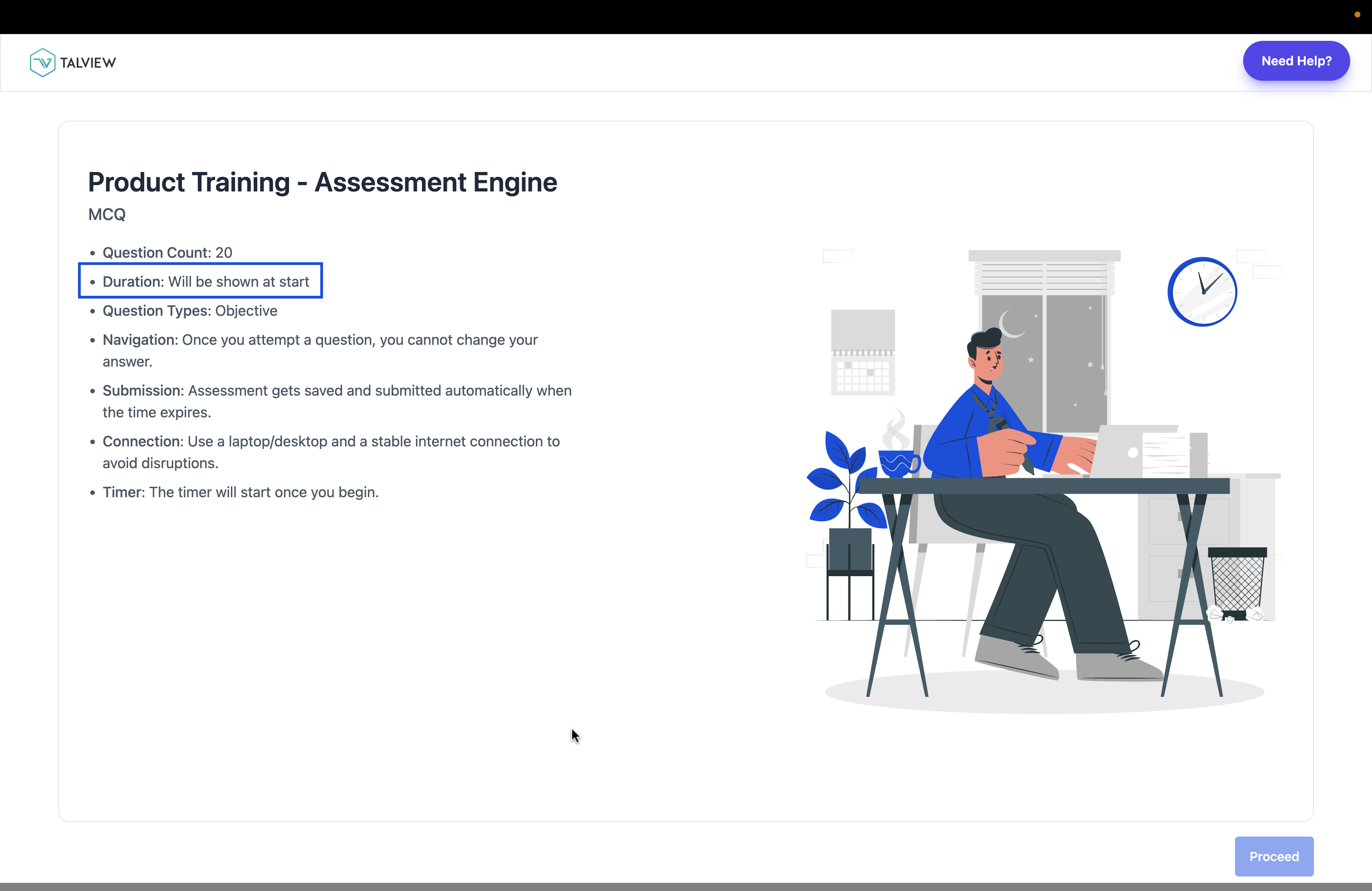
 **3️⃣ "Duration" Label on Assessment Instruction Screens**
**Description:** The "Test Duration" label now reads "Duration" across all assessment instruction screens, including async, sync, proctored, and coding assessments.
**What's New**
* Label updated from "Test Duration" to "Duration" across all instruction screen types.
* Keeps candidate-facing wording neutral and consistent on every instruction screen.
**3️⃣ "Duration" Label on Assessment Instruction Screens**
**Description:** The "Test Duration" label now reads "Duration" across all assessment instruction screens, including async, sync, proctored, and coding assessments.
**What's New**
* Label updated from "Test Duration" to "Duration" across all instruction screen types.
* Keeps candidate-facing wording neutral and consistent on every instruction screen.
 ***
#### 🐞 Bug Fixes
* Overall Writing score appearing as a number instead of a CEFR band.
* Coding and Code Pair questions failing to upload through bulk upload.
* Cursor jumping to a new line while a candidate was typing their response.
***
### Admin Updates
This month, we focused on **improving form reliability and user management flows**.
#### ⚙️ Enhancements
1️⃣ **Publishing Safeguard**
***
#### 🐞 Bug Fixes
* Overall Writing score appearing as a number instead of a CEFR band.
* Coding and Code Pair questions failing to upload through bulk upload.
* Cursor jumping to a new line while a candidate was typing their response.
***
### Admin Updates
This month, we focused on **improving form reliability and user management flows**.
#### ⚙️ Enhancements
1️⃣ **Publishing Safeguard**
The form editor header and canvas are now locked while a form is publishing, preventing conflicting actions mid-publish.
2️⃣ **Users List: Cleaner View**
The "User Group" column has been removed from the Users list for a cleaner, more focused view.
***
#### 🐞 Bug Fixes
* Form response/save operations taking longer than expected.
* Adding a new option in a V8 form caused existing options to move out of the visible container.
* Number field displaying an incorrect validation error with no validation configured.
* Form editor staying dark after switching the app to Light mode.
* Renamed form reverting to its previous name after saving.
* Unable to scroll by touchpad within a V8 form.
* Forms failing to publish when an embedded audio file was added.
* Min/max range configuration for the Date field not being enforced correctly in V8 forms.