> ## Documentation Index
> Fetch the complete documentation index at: https://docs.talview.com/llms.txt
> Use this file to discover all available pages before exploring further.

# October 2025 Release Updates

We’re excited to share our October 2025 updates! This release focuses on **AI-powered evaluation enhancements**, **workflow automation**, **external assessment integration**, and **scheduling improvements** - all designed to improve speed, visibility, and efficiency for recruiters, evaluators, and candidates.

***

## 🛠️ Workflow Tools Enhancements

### Ivy Playback View with Scores

Evaluators can now review candidate responses and scores within a unified Ivy Playback interface. This includes:

* Seamless playback of candidate recordings
* Inline scoring fields
* Streamlined navigation for faster evaluations

**Check it out here:**

<div style={{ position:"relative",paddingBottom:"calc(54.02777777777777% + 41px)",height:0,width:"600px",margin:"0 auto" }}>
  <iframe src="https://demo.arcade.software/gpZOv3wcn4gEfi0LamqV?embed&embed_mobile=tab&embed_desktop=inline&show_copy_link=true" title="Review Candidate's Ivy Responses as an evaluator" frameBorder="0" loading="lazy" webkitAllowFullScreen mozAllowFullScreen allowFullScreen allow="clipboard-write" style={{ position:"absolute",top:0,left:0,width:"100%",height:"100%",colorScheme:"light" }} />
</div>

***

### Ivy Summary View

Recruiters and hiring managers can now see **AI-generated summaries** of Ivy interviews, highlighting:

* Key conversation themes
* Candidate strengths
* Areas for improvement

This accelerates decision-making without the need to replay full interviews.

**Check it out here:**

<div style={{ position:"relative",paddingBottom:"calc(54.02777777777777% + 41px)",height:0,width:"600px",margin:"0 auto" }}>
  <iframe src="https://demo.arcade.software/pNmGNEMeV8Jjj5mK2M2z?embed&embed_mobile=tab&embed_desktop=inline&show_copy_link=true" title="View the Ivy Assessment Summary against a candidate as a recruiter" frameBorder="0" loading="lazy" webkitAllowFullScreen mozAllowFullScreen allowFullScreen allow="clipboard-write" style={{ position:"absolute",top:0,left:0,width:"100%",height:"100%",colorScheme:"light" }} />
</div>

***

### Public Registration Workflows

Recruiters can now:

* Open workflows for **public candidate registration** via a unique link or QR code
* Close or reopen registrations anytime to manage volume and control flow

This enables **self-registration**, eliminates manual entry, and improves onboarding visibility.

**Check it out here:**

<div style={{ position:"relative",paddingBottom:"calc(54.02777777777777% + 41px)",height:0,width:"600px",margin:"0 auto" }}>
  <iframe src="https://demo.arcade.software/6MjeRJ4LDD6NdTmXk6F1?embed&embed_mobile=tab&embed_desktop=inline&show_copy_link=true" title="Open a workflow for candidate registration" frameBorder="0" loading="lazy" webkitAllowFullScreen mozAllowFullScreen allowFullScreen allow="clipboard-write" style={{ position:"absolute",top:0,left:0,width:"100%",height:"100%",colorScheme:"light" }} />
</div>

***

## 📲 Scheduling Enhancements

### Guest Interviewer Scheduling (Whitelisted Domains)

Recruiters can now schedule interviews with **external evaluators** using approved domains. Features include:

* Auto-creation of guest profiles
* Calendar invites with secure access
* View of candidate profiles and comment-based evaluations

<div style={{ position:"relative",paddingBottom:"calc(54.02777777777777% + 41px)",height:0,width:"600px",margin:"0 auto" }}>
  <iframe src="https://demo.arcade.software/Bnp4yC4q98e0jAYWB5r3?embed&embed_mobile=tab&embed_desktop=inline&show_copy_link=true" title="Schedule an interview with a guest interviewer" frameBorder="0" loading="lazy" webkitAllowFullScreen mozAllowFullScreen allowFullScreen allow="clipboard-write" style={{ position:"absolute",top:0,left:0,width:"100%",height:"100%",colorScheme:"light" }} />
</div>

***

### Automated Scheduler Selection

When using Intelligent Scheduler:

* **“Notify Everyone” enabled** → triggers intelligent notifications to all participants
* **Disabled** → defaults to regular scheduler (no alerts)

***

### Resume Access in Scheduling Emails

Evaluators can now **view candidate resumes directly** from interview invite emails, improving pre-interview preparation without needing platform logins.

**Check it out below:**

<div style={{ position:"relative",paddingBottom:"calc(54.02777777777777% + 41px)",height:0,width:"600px",margin:"0 auto" }}>
  <iframe src="https://demo.arcade.software/dFmFH05azNmnCnGAO0Pa?embed&embed_mobile=tab&embed_desktop=inline&show_copy_link=true" title="View and download a Candidate Resume from the Interview Invitation Email" frameBorder="0" loading="lazy" webkitAllowFullScreen mozAllowFullScreen allowFullScreen allow="clipboard-write" style={{ position:"absolute",top:0,left:0,width:"100%",height:"100%",colorScheme:"light" }} />
</div>

***

## 🧑‍💼 Interview Rooms Enhancements

### Auto-Trigger 360° Environment Scan + Secondary Camera \[Alpha]

* Auto-launch of candidate verification steps (360° scan + secondary camera)
* Improves session readiness and reduces setup delays

***

### Integrated Evaluation in Interview Rooms \[Alpha]

* Evaluations can now be tracked directly in Interview Rooms for interviews scheduled via Workflow Tools
* Enables consistent feedback capture without switching tools

***

## 📊 Assessment Engine Updates

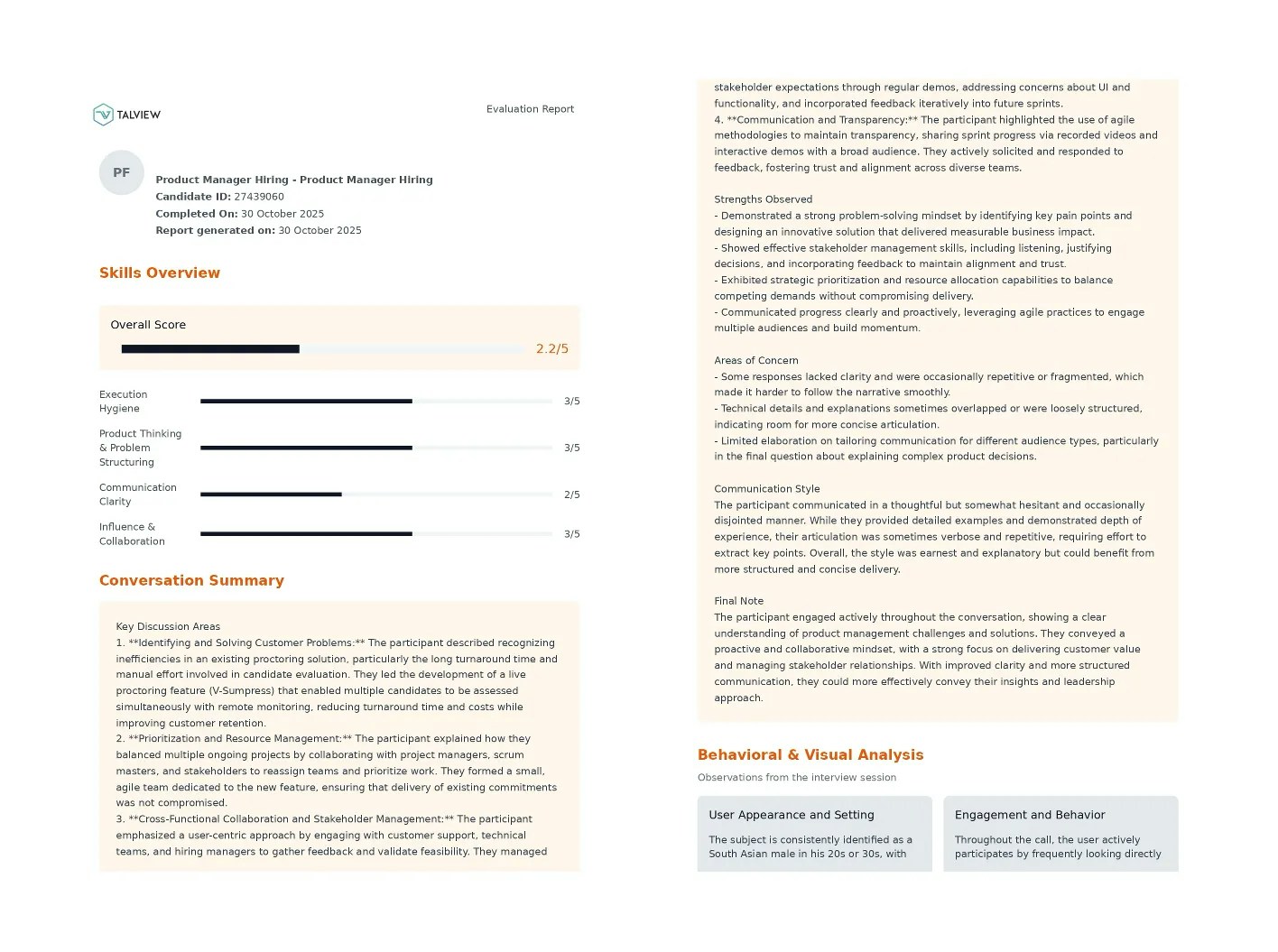
### Ivy Report Enhancements

The Ivy Report now includes:

* AI-generated conversation summary
* Candidate strengths, concerns, and communication style
* Final evaluation notes

This provides full context in a single view — no replays required.
<img src="https://mintcdn.com/talview-f3acd66d/YePG8iXOg1RVl1TR/images/Screenshot_2025-10-30_at_3.51.32_PM.webp?fit=max&auto=format&n=YePG8iXOg1RVl1TR&q=85&s=9d2485bc6a6f6fba3b1ab0e112b33803" alt="Screenshot_2025-10-30_at_3.51.32_PM.webp" width="1416" height="1055" data-path="images/Screenshot_2025-10-30_at_3.51.32_PM.webp" />

***

## 🔐 Proctoring Enhancements

### Secure Browser Blocklist Updates

New applications added to the blocklist:

* **Windows**: TechSmith Relay Recorder
* **macOS**: Camtasia, Icecream Screen Recorder

Also, **.exe download instructions** on Talview pages are now less prominent.

<img src="https://mintcdn.com/talview-f3acd66d/UBOM0OIh6aSg8VNT/images/image(55).png?fit=max&auto=format&n=UBOM0OIh6aSg8VNT&q=85&s=cea53c74c0b0001b693ee78499e36f18" alt="image (55).png" width="1542" height="688" data-path="images/image(55).png" />

***

## ⚙️ LMS Integrations (Browser Extension v1.5.0)

### Totara LMS Integration with Proctoring

Proview Proctoring is now fully integrated with Totara LMS:

* **Configure proctoring for SCORM**

<div style={{ position:"relative",paddingBottom:"calc(54.02777777777777% + 41px)",height:0,width:"600px",margin:"0 auto" }}>
  <iframe src="https://demo.arcade.software/ntRlZN88yMHkFQVarVoN?embed&embed_mobile=tab&embed_desktop=inline&show_copy_link=true" title="Configure proctoring for a SCORM package" frameBorder="0" loading="lazy" webkitAllowFullScreen mozAllowFullScreen allowFullScreen allow="clipboard-write" style={{ position:"absolute",top:0,left:0,width:"100%",height:"100%",colorScheme:"light" }} />
</div>

* **View session recordings**

<div style={{ position:"relative",paddingBottom:"calc(54.02777777777777% + 41px)",height:0,width:"600px",margin:"0 auto" }}>
  <iframe src="https://demo.arcade.software/3NwZN4iOspPnMOU1Gc6G?embed&embed_mobile=tab&embed_desktop=inline&show_copy_link=true" title="Accessing session recording" frameBorder="0" loading="lazy" webkitAllowFullScreen mozAllowFullScreen allowFullScreen allow="clipboard-write" style={{ position:"absolute",top:0,left:0,width:"100%",height:"100%",colorScheme:"light" }} />
</div>

* **Candidates can attempt proctored SCORM packages**

<div style={{ position:"relative",paddingBottom:"calc(54.02777777777777% + 41px)",height:0,width:"600px",margin:"0 auto" }}>
  <iframe src="https://demo.arcade.software/WAmTMsNXTjwtVy4jXUT0?embed&embed_mobile=tab&embed_desktop=inline&show_copy_link=true" title="Attempt a proctored SCORM package" frameBorder="0" loading="lazy" webkitAllowFullScreen mozAllowFullScreen allowFullScreen allow="clipboard-write" style={{ position:"absolute",top:0,left:0,width:"100%",height:"100%",colorScheme:"light" }} />
</div>

***

### Moodle LMS 4.5 – Secure Browser Support

Coordinators can now enable **Secure Browser** for quizzes **without selecting a proctoring type** in Moodle 4.5.

<div style={{ position:"relative",paddingBottom:"calc(54.02777777777777% + 41px)",height:0,width:"600px",margin:"0 auto" }}>
  <iframe src="https://demo.arcade.software/tLi8tDi2DvsildsCT1BN?embed&embed_mobile=tab&embed_desktop=inline&show_copy_link=true" title="Configure Secure Browser only for a quiz" frameBorder="0" loading="lazy" webkitAllowFullScreen mozAllowFullScreen allowFullScreen allow="clipboard-write" style={{ position:"absolute",top:0,left:0,width:"100%",height:"100%",colorScheme:"light" }} />
</div>

***

### AU Region Support for Browser Extension

Proview browser extension now supports **Australia (AU) region deployments**, enabling use for partners like **La Trobe University**.

***

## 🧾 Payment Enhancements

### Invoice Updates

Invoices now include the **company name in billing details**, simplifying reimbursement processes for candidates.

***

Thanks for reading the **October 2025 release notes**!
