> ## Documentation Index
> Fetch the complete documentation index at: https://docs.talview.com/llms.txt
> Use this file to discover all available pages before exploring further.
# August 2026 Release Updates
The August 2026 release delivers enhancements across **Workflow Tools, Interview Rooms, Proctoring, Assessment Engine & Candidate Experience, and Admin**, introducing improved notification controls, expanded candidate visibility, new Form Builder capabilities, and platform reliability improvements.
***
### Workflow Tools Enhancements
This month, we introduced enhancements focused on improved notification control, candidate assessment history, expanded workflow fields, and global candidate visibility.
#### 🆕 Features
**1️⃣ Notification Preferences**
**Description**: Users can now control which notifications they receive and on which channel from a dedicated Notifications Preferences page under Settings.
**What's New**
* Notification categories listed with a short description of what each one covers.
* Per-category channel selection, check or uncheck each channel individually.
* Email and In-App available for all users; SMS available to users with a phone number on their profile.
* Preferences enforced on the backend send path, so an unselected channel is skipped at delivery. Preference changes save immediately with no separate save action.
 **2️⃣ Previous Assessment Attempts**
**Description**: Recruiters can now review all previous assessment attempts for a candidate, not just the most recent one.
**What's New**
* Activity History entry in the Assessment side panel kebab menu.
* Previous attempts list with one card per attempt.
* Attempt detail view showing overview and score, with back navigation. Preview of previous assessment responses.
**3️⃣ Additional Fields & Column Picker**
**Description**: Workflows now carry a wider set of structured fields, and recruiters can choose which fields appear as columns in their candidate lists.
**What's New**
* New workflow fields across Job Classification, Skills, Location, Hiring Timeline, and Project and Contract flags.
* Column picker on the candidate list, with selections saved per user and applied across workflows. Search extended to cover the additional candidate fields.
**4️⃣ Global Candidate View: Candidate Profile Columns**
**Description**: The Global Candidate View now includes education, work experience, and Resume Fitment status as columns.
**What's New**
* Education and Resume Fitment status columns added to the candidate table.
* Work experience sourced from the structured candidate record, covering designation, organization, start and end dates, and current-role flag.
* Experience data now visible to Hiring Managers, Collaborators, Evaluators, and External Evaluators.
***
#### 🐞 Bug Fixes
**Workflow Tools: Candidate Lists, Evaluation & Workflow Setup**
* Restored global search, advanced filters, quick actions, and bulk actions across Workflow Tools.
* Fixed Resume Fitment defects, assessment scoring errors, and evaluation flow issues.
* Fixed workflow setup problems, public registration form rendering, and broken empty states.
**Notifications & Screening: Email Delivery, Parsing & Ivy**
* Fixed interview invitation, assessment reminder, and technical assessment emails not triggering.
* Fixed incorrect scheduling links and interview dates sent to candidates.
* Fixed Ivy call transcription unavailability and Potential Fit candidates incorrectly assigned Turn Down status.
* Improved resume parsing performance.
***
### Proctoring Updates
***
### Interview Rooms Enhancements
This month, we introduced enhancements focused on improved transcription accuracy.
#### ⚙️ Enhancements
**1️⃣ Soniox Transcription Accuracy**
Resolved language identification hallucinations in Soniox via English language hints and strict LID mode. Rate-limit and concurrency constraints have also been addressed.
***
#### 🐞 Bug Fixes
* Fixed an intermittent transcription failure.
***
### Assessment Engine & Candidate Experience Updates
This month, we focused on improved candidate experience controls and assessment authoring.
#### 🆕 Features
1️⃣ **Exit Confirmation for Test Sessions**
**Description**: Candidates now get a browser warning before accidentally leaving an active test.
**What's New**
Native browser confirmation prompt appears if a candidate tries to close or refresh the tab during an active test. Applies only while a test is in progress, not on instruction, hardware-check, or post-submission pages.
***
#### ⚙️ Enhancements
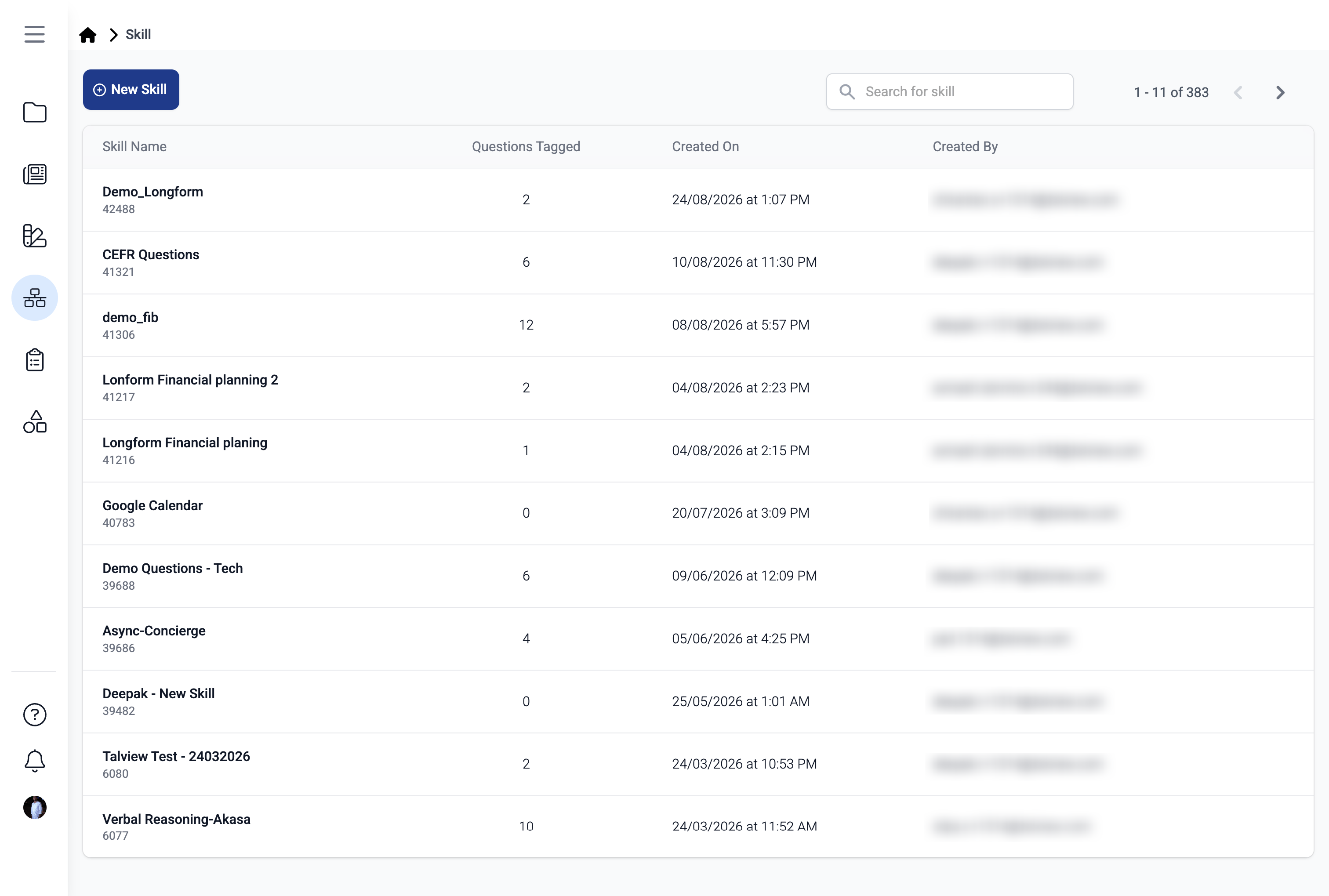
1️⃣ **Skill ID Now Visible in Skill List**
The skill list now displays each skill's ID, making it faster to find and reference the right skill.
**2️⃣ Previous Assessment Attempts**
**Description**: Recruiters can now review all previous assessment attempts for a candidate, not just the most recent one.
**What's New**
* Activity History entry in the Assessment side panel kebab menu.
* Previous attempts list with one card per attempt.
* Attempt detail view showing overview and score, with back navigation. Preview of previous assessment responses.
**3️⃣ Additional Fields & Column Picker**
**Description**: Workflows now carry a wider set of structured fields, and recruiters can choose which fields appear as columns in their candidate lists.
**What's New**
* New workflow fields across Job Classification, Skills, Location, Hiring Timeline, and Project and Contract flags.
* Column picker on the candidate list, with selections saved per user and applied across workflows. Search extended to cover the additional candidate fields.
**4️⃣ Global Candidate View: Candidate Profile Columns**
**Description**: The Global Candidate View now includes education, work experience, and Resume Fitment status as columns.
**What's New**
* Education and Resume Fitment status columns added to the candidate table.
* Work experience sourced from the structured candidate record, covering designation, organization, start and end dates, and current-role flag.
* Experience data now visible to Hiring Managers, Collaborators, Evaluators, and External Evaluators.
***
#### 🐞 Bug Fixes
**Workflow Tools: Candidate Lists, Evaluation & Workflow Setup**
* Restored global search, advanced filters, quick actions, and bulk actions across Workflow Tools.
* Fixed Resume Fitment defects, assessment scoring errors, and evaluation flow issues.
* Fixed workflow setup problems, public registration form rendering, and broken empty states.
**Notifications & Screening: Email Delivery, Parsing & Ivy**
* Fixed interview invitation, assessment reminder, and technical assessment emails not triggering.
* Fixed incorrect scheduling links and interview dates sent to candidates.
* Fixed Ivy call transcription unavailability and Potential Fit candidates incorrectly assigned Turn Down status.
* Improved resume parsing performance.
***
### Proctoring Updates
***
### Interview Rooms Enhancements
This month, we introduced enhancements focused on improved transcription accuracy.
#### ⚙️ Enhancements
**1️⃣ Soniox Transcription Accuracy**
Resolved language identification hallucinations in Soniox via English language hints and strict LID mode. Rate-limit and concurrency constraints have also been addressed.
***
#### 🐞 Bug Fixes
* Fixed an intermittent transcription failure.
***
### Assessment Engine & Candidate Experience Updates
This month, we focused on improved candidate experience controls and assessment authoring.
#### 🆕 Features
1️⃣ **Exit Confirmation for Test Sessions**
**Description**: Candidates now get a browser warning before accidentally leaving an active test.
**What's New**
Native browser confirmation prompt appears if a candidate tries to close or refresh the tab during an active test. Applies only while a test is in progress, not on instruction, hardware-check, or post-submission pages.
***
#### ⚙️ Enhancements
1️⃣ **Skill ID Now Visible in Skill List**
The skill list now displays each skill's ID, making it faster to find and reference the right skill.
 2️⃣ **Retakes Off by Default for New Async Assessment Sections**
Question-level retakes are now disabled by default when creating a new asynchronous assessment section. Existing assessments are unaffected.
3️⃣ **Editing Disabled for Published Assessments**
Assessments can no longer be edited once published, preventing accidental changes after approval.
***
#### 🐞 Bug Fixes
Fixed an issue where only multiple-choice questions could be added to an assessment from a skill, even when other published question types were available.
***
### Admin (Forms) Updates
This month, we focused on **improving form reliability**.
#### 🐞 Bug Fixes
* Incorrect form status color in the Form List view.
* Hidden field rendered without meeting its conditional logic.
* Unable to enter details in Preview Mode.
* Unable to upload a PDF file in the File Upload field, blocking form submission.
* Long text input overflowing outside the form instead of wrapping correctly.
* Download failing after form submission with a "File data not found" error.
* Phone number text not visible due to low contrast in the Phone Number field.
***
2️⃣ **Retakes Off by Default for New Async Assessment Sections**
Question-level retakes are now disabled by default when creating a new asynchronous assessment section. Existing assessments are unaffected.
3️⃣ **Editing Disabled for Published Assessments**
Assessments can no longer be edited once published, preventing accidental changes after approval.
***
#### 🐞 Bug Fixes
Fixed an issue where only multiple-choice questions could be added to an assessment from a skill, even when other published question types were available.
***
### Admin (Forms) Updates
This month, we focused on **improving form reliability**.
#### 🐞 Bug Fixes
* Incorrect form status color in the Form List view.
* Hidden field rendered without meeting its conditional logic.
* Unable to enter details in Preview Mode.
* Unable to upload a PDF file in the File Upload field, blocking form submission.
* Long text input overflowing outside the form instead of wrapping correctly.
* Download failing after form submission with a "File data not found" error.
* Phone number text not visible due to low contrast in the Phone Number field.
***