> ## Documentation Index
> Fetch the complete documentation index at: https://docs.talview.com/llms.txt
> Use this file to discover all available pages before exploring further.
# September 2024 Release Updates
> Stay updated with the latest features and enhancements rolled out in September 2024 across Talview’s Orchestration Platform (TOP) – including Workflow Tools, Candidate Experience, Interview Rooms, and Proview (Proctoring)
## Workflow Tools Updates
**Basic Pre-interview dashboard**
Interviewers often lack easy access to key candidate and job details, leading to inefficiencies. The new Pre-Interview Dashboard addresses this by providing interview, candidate and workflow fields, and job descriptions directly within Intelligent Scheduling emails, improving interview preparation and decision-making efficiency.
**Evaluator enhancements in WFT**
Recruiters can now assign evaluators to candidates directly through the platform, with evaluators receiving email notifications and viewing assigned candidates in list and detail views. This streamlines the evaluation process and improves engagement and efficiency.
**Pay and Book Workflow**
Candidates need a simplified and integrated process to pay for their exams and book exam slots, reducing manual coordination and delays in exam scheduling. The new Pay and Book Workflow allows candidates to seamlessly pay for their exams and book available exam slots in one unified experience.
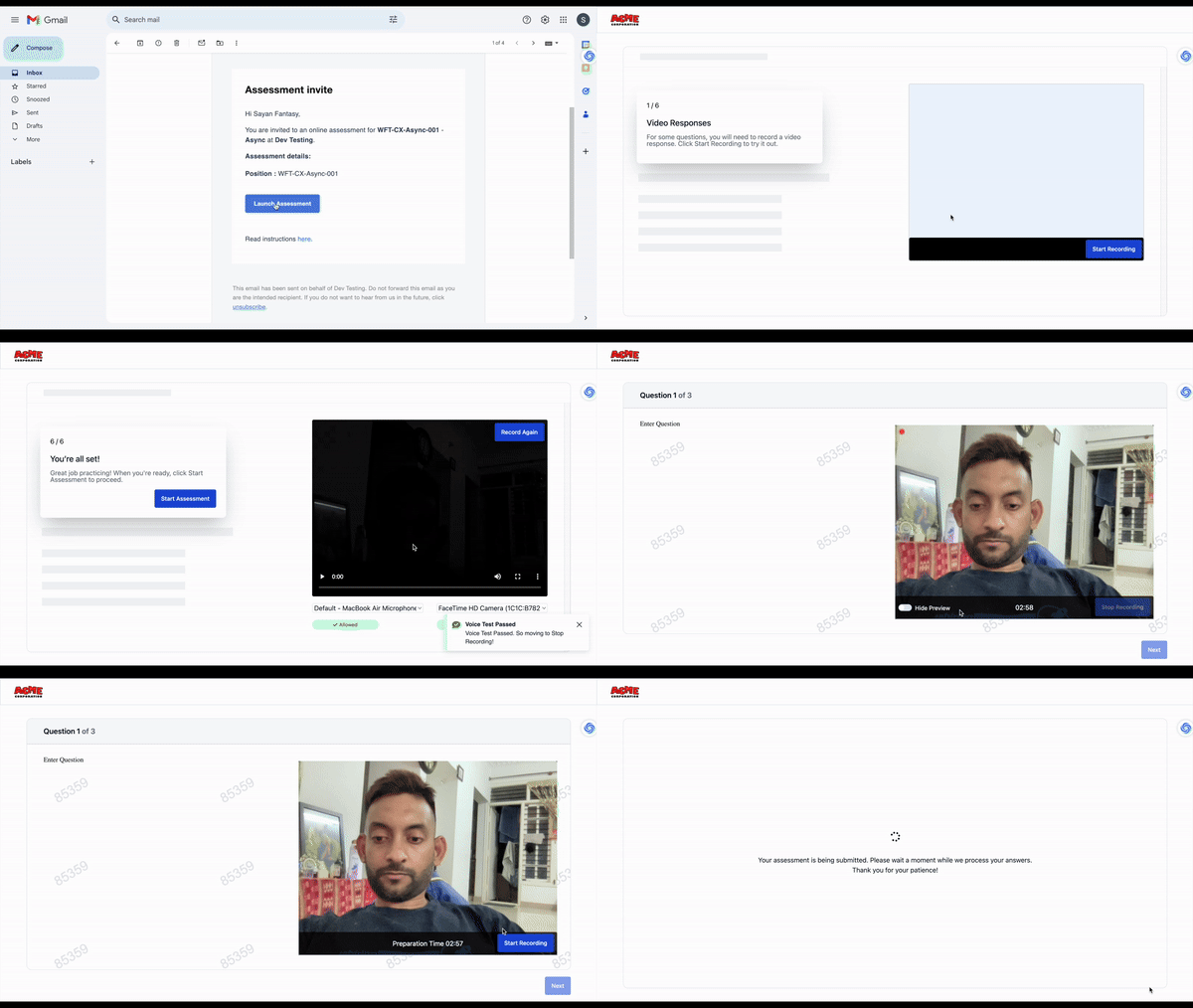
 **Async interviews with the Test taker experience**
Candidates face difficulties completing async interviews due to a lack of onboarding and technical setup, leading to delays and incomplete interviews. The new Async Interview workflow addresses this by providing guided onboarding with step-by-step browser permissions, hardware checks, the ability to hide video previews, configurable preparation time, and reattempt options. This improves completion rates, enhances the candidate experience, and reduces technical support queries.
**Async interviews with the Test taker experience**
Candidates face difficulties completing async interviews due to a lack of onboarding and technical setup, leading to delays and incomplete interviews. The new Async Interview workflow addresses this by providing guided onboarding with step-by-step browser permissions, hardware checks, the ability to hide video previews, configurable preparation time, and reattempt options. This improves completion rates, enhances the candidate experience, and reduces technical support queries.
 ## Interview rooms Updates
### **What is in the release?**
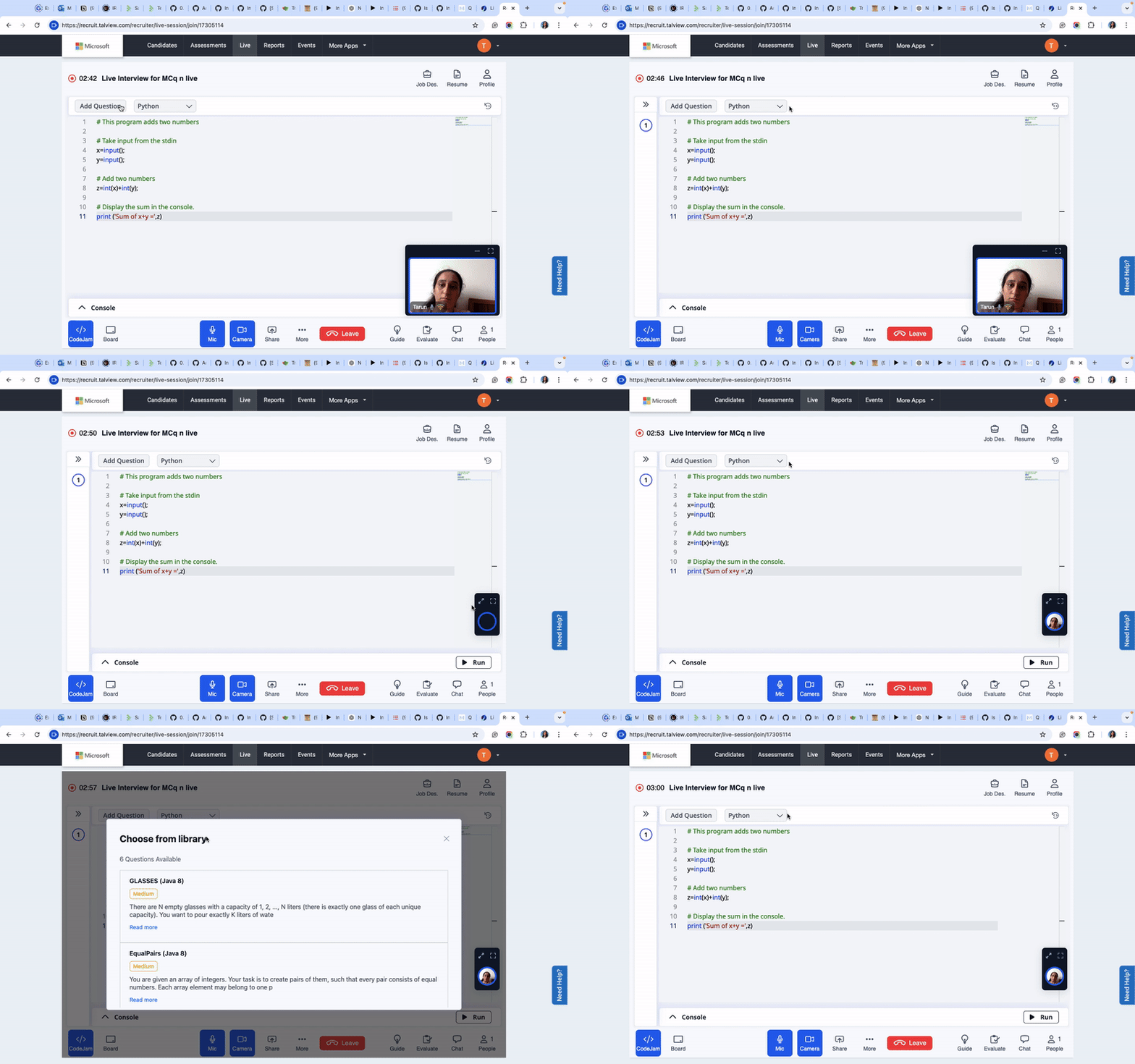
**Add question for Codejam**
* **Description**: You can now effortlessly add questions to CodeJam sessions directly within Interview Rooms, ensuring a more integrated technical assessment experience.
* **Benefits**:
* Streamlined question management during interviews.
* Greater flexibility for interviewers to assess coding skills in real-time.
## Interview rooms Updates
### **What is in the release?**
**Add question for Codejam**
* **Description**: You can now effortlessly add questions to CodeJam sessions directly within Interview Rooms, ensuring a more integrated technical assessment experience.
* **Benefits**:
* Streamlined question management during interviews.
* Greater flexibility for interviewers to assess coding skills in real-time.
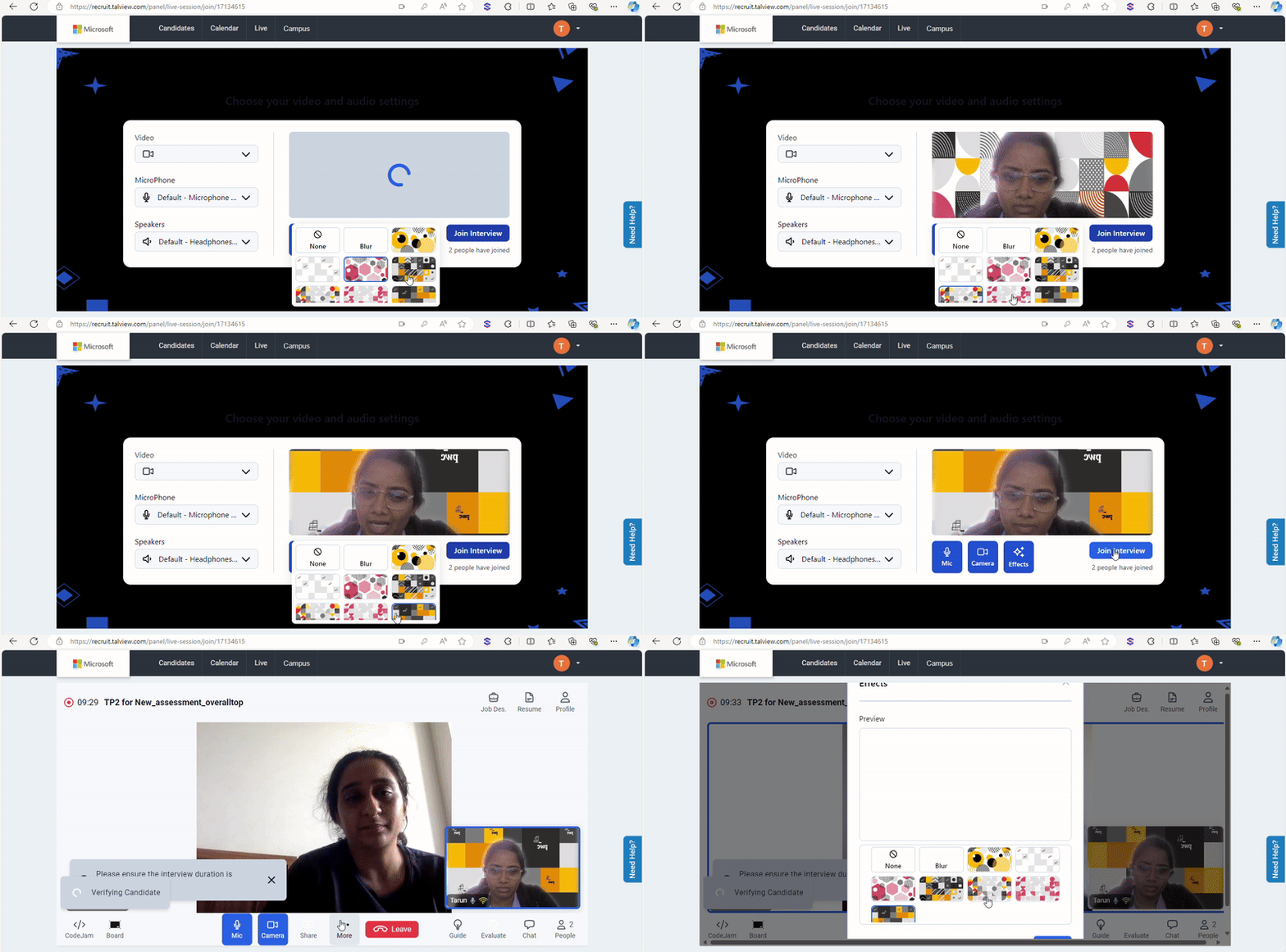
 **Select from multiple images for background**
* **Description**: Ability to select from multiple background images, allowing interviewers to customize their interview space visually.
* **Benefits**:
* Enhances professionalism with tailored backgrounds.
* Gives a personal touch to the interview environment
**Select from multiple images for background**
* **Description**: Ability to select from multiple background images, allowing interviewers to customize their interview space visually.
* **Benefits**:
* Enhances professionalism with tailored backgrounds.
* Gives a personal touch to the interview environment
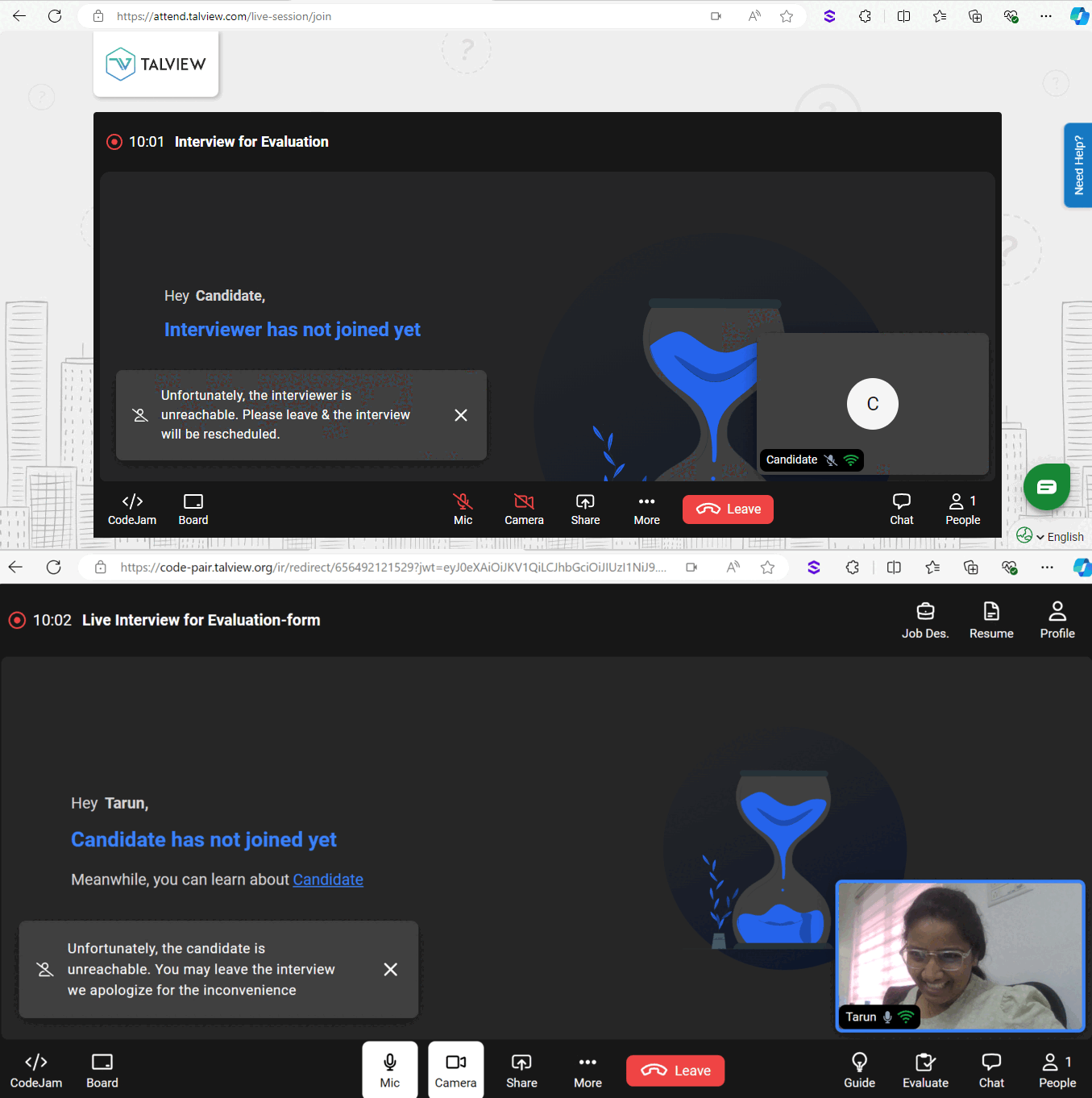
 **Drop alert after 10 minutes of No-Show**
* **Description**: Get notified to exit the interview if the other participant hasn’t joined within 10 minutes, saving time and avoiding unnecessary waiting.
* **Benefits**:
* Reduces frustration by setting clear boundaries.
* Encourages punctuality and accountability.
* Enhances user experience with proactive notifications.
**Drop alert after 10 minutes of No-Show**
* **Description**: Get notified to exit the interview if the other participant hasn’t joined within 10 minutes, saving time and avoiding unnecessary waiting.
* **Benefits**:
* Reduces frustration by setting clear boundaries.
* Encourages punctuality and accountability.
* Enhances user experience with proactive notifications.
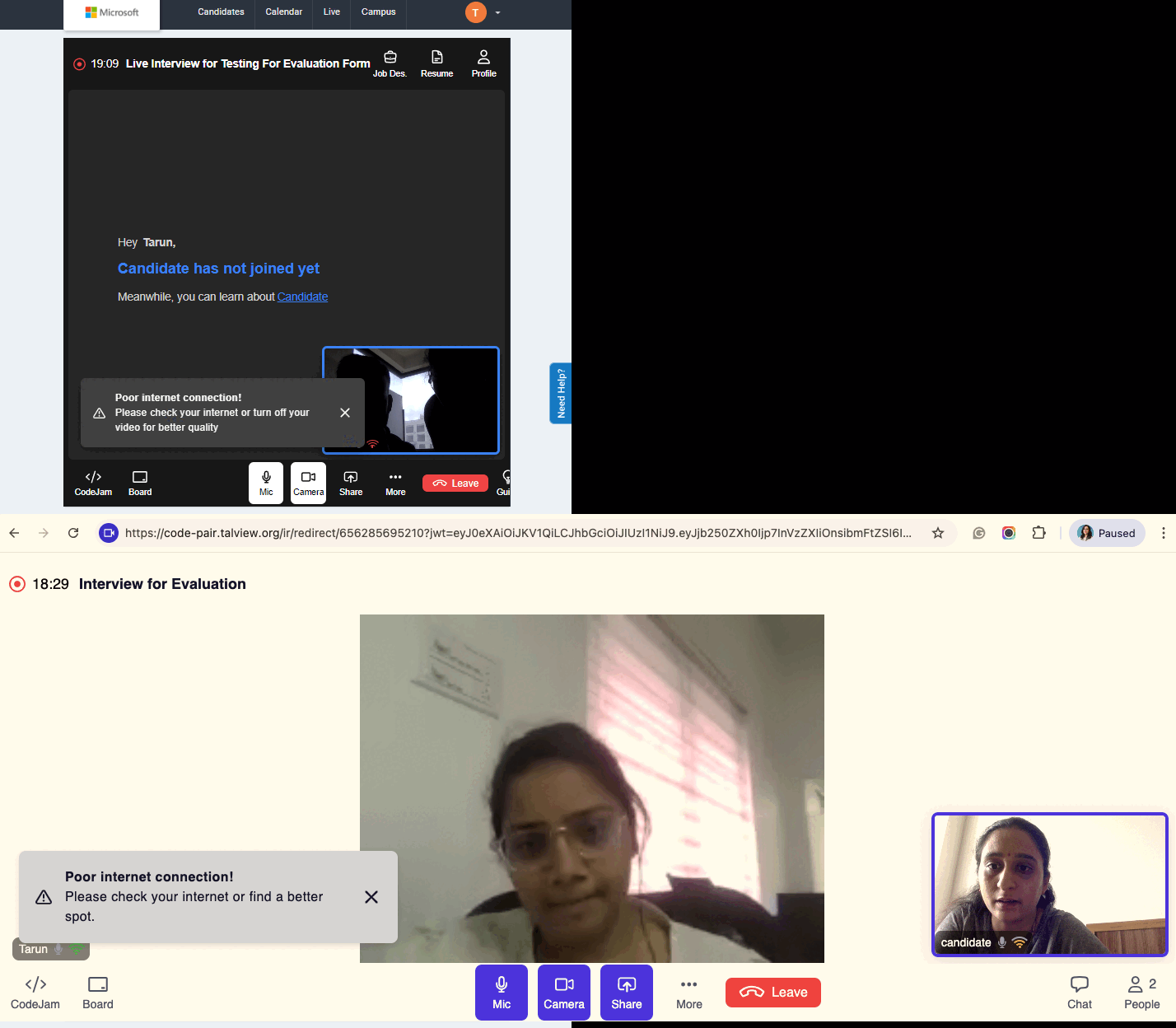
 **Low bandwidth self notification**
* **Description**: Both interviewers and candidates will now receive notifications if their bandwidth is running low, helping them troubleshoot connectivity issues proactively.
* **Benefits**:
* Enhances interview quality by preventing disruptions due to poor connection.
* Provides real-time feedback for better session performance.
**Low bandwidth self notification**
* **Description**: Both interviewers and candidates will now receive notifications if their bandwidth is running low, helping them troubleshoot connectivity issues proactively.
* **Benefits**:
* Enhances interview quality by preventing disruptions due to poor connection.
* Provides real-time feedback for better session performance.
 **Service Provider Fallback Notification**
* **Description**: When the system automatically switches to a backup service provider, the other participant will now receive a notification.
* **Benefits**:
* Ensures smoother transitions when connectivity issues arise.
* Keeps both interviewers and candidates informed about potential delays or changes.
**Bug Fixes**\
We have focused on closing the high-priority bugs listed below:
* Clicking on enter after typing in Ask AI sends the response.
* Candidate unable to join the session in iOS mobile application and in mobile browser.
* Scroll bars were visible in the chat box for IR with IS.
## Proview (Proctoring) Updates
## Proctor NG
### Enhancements
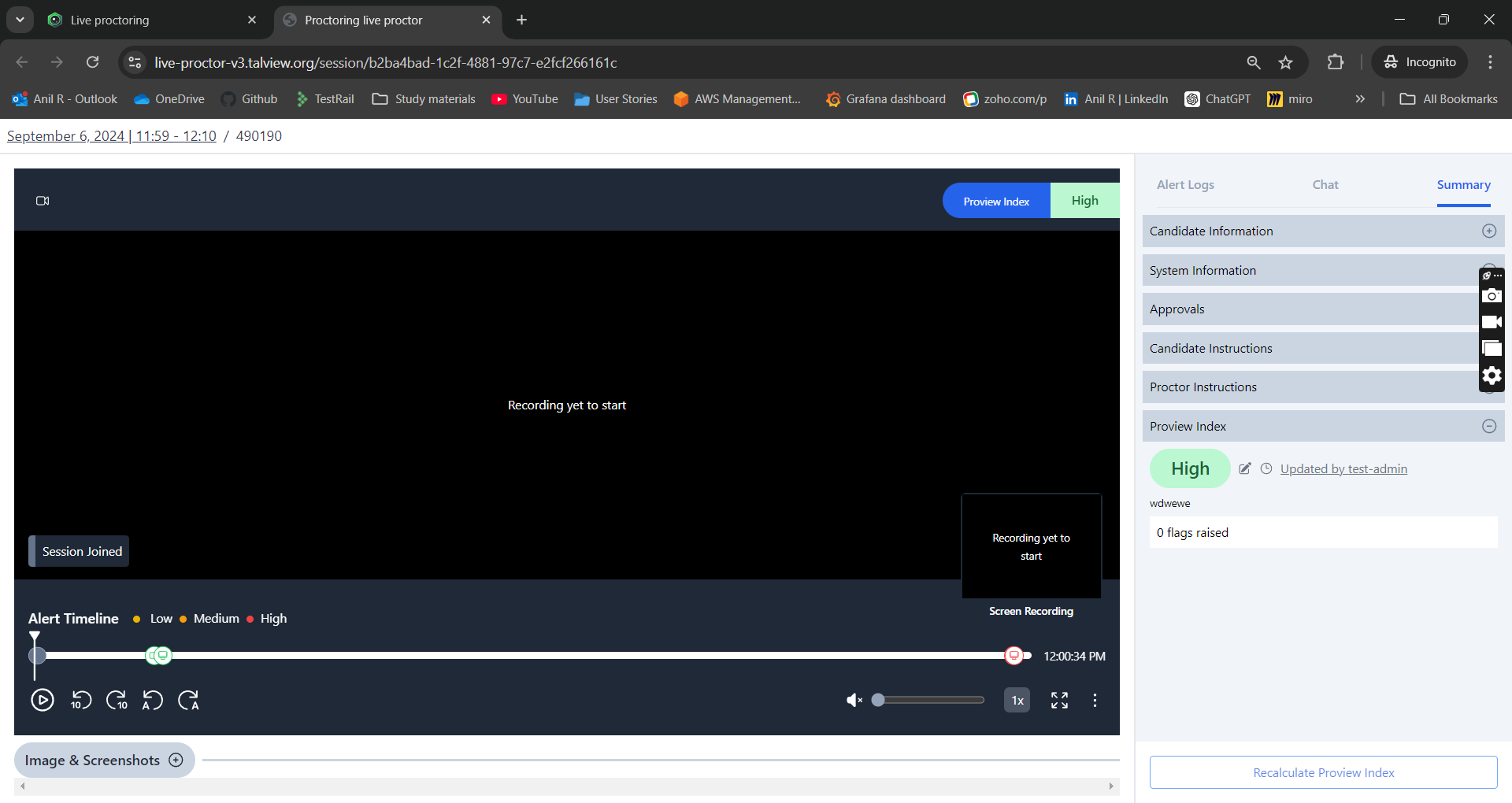
1. **Test admin can update Proview Index**\
Test admins now have the ability to manually override the Proview Index. In the past, only the Proctor role had this permission.
**Service Provider Fallback Notification**
* **Description**: When the system automatically switches to a backup service provider, the other participant will now receive a notification.
* **Benefits**:
* Ensures smoother transitions when connectivity issues arise.
* Keeps both interviewers and candidates informed about potential delays or changes.
**Bug Fixes**\
We have focused on closing the high-priority bugs listed below:
* Clicking on enter after typing in Ask AI sends the response.
* Candidate unable to join the session in iOS mobile application and in mobile browser.
* Scroll bars were visible in the chat box for IR with IS.
## Proview (Proctoring) Updates
## Proctor NG
### Enhancements
1. **Test admin can update Proview Index**\
Test admins now have the ability to manually override the Proview Index. In the past, only the Proctor role had this permission.
 2. **Proctor Buffer Time description**\
Users creating an event lacked clear guidance on the meaning of the proctor buffer time and were unaware of the default start buffer time. To eliminate any confusion, a brief explanation about the default start buffer time has been added.
2. **Proctor Buffer Time description**\
Users creating an event lacked clear guidance on the meaning of the proctor buffer time and were unaware of the default start buffer time. To eliminate any confusion, a brief explanation about the default start buffer time has been added.
 ### Bug Fixes
1. **Wrapper Form – UI issue**
* **Issue:** Long redirect URL would not get truncated.
* **Solution:** The necessary fix has been implemented to truncate long redirect URLs.
2. **Proctor app – UI issue**
* **Issue:** Misalignment in the candidate table.
* **Solution:** The UI has been fixed to correctly align the columns and the data in the table.
3. **Face verification dependent on ID verification setting**
* **Issue:** Disabling the `id_verification_check` setting would prevent face capture from appearing in the approvals section during playback.
* **Solution:** ID and face verification can now be enabled or disabled independently.
***
## Integrations
### Enhancements
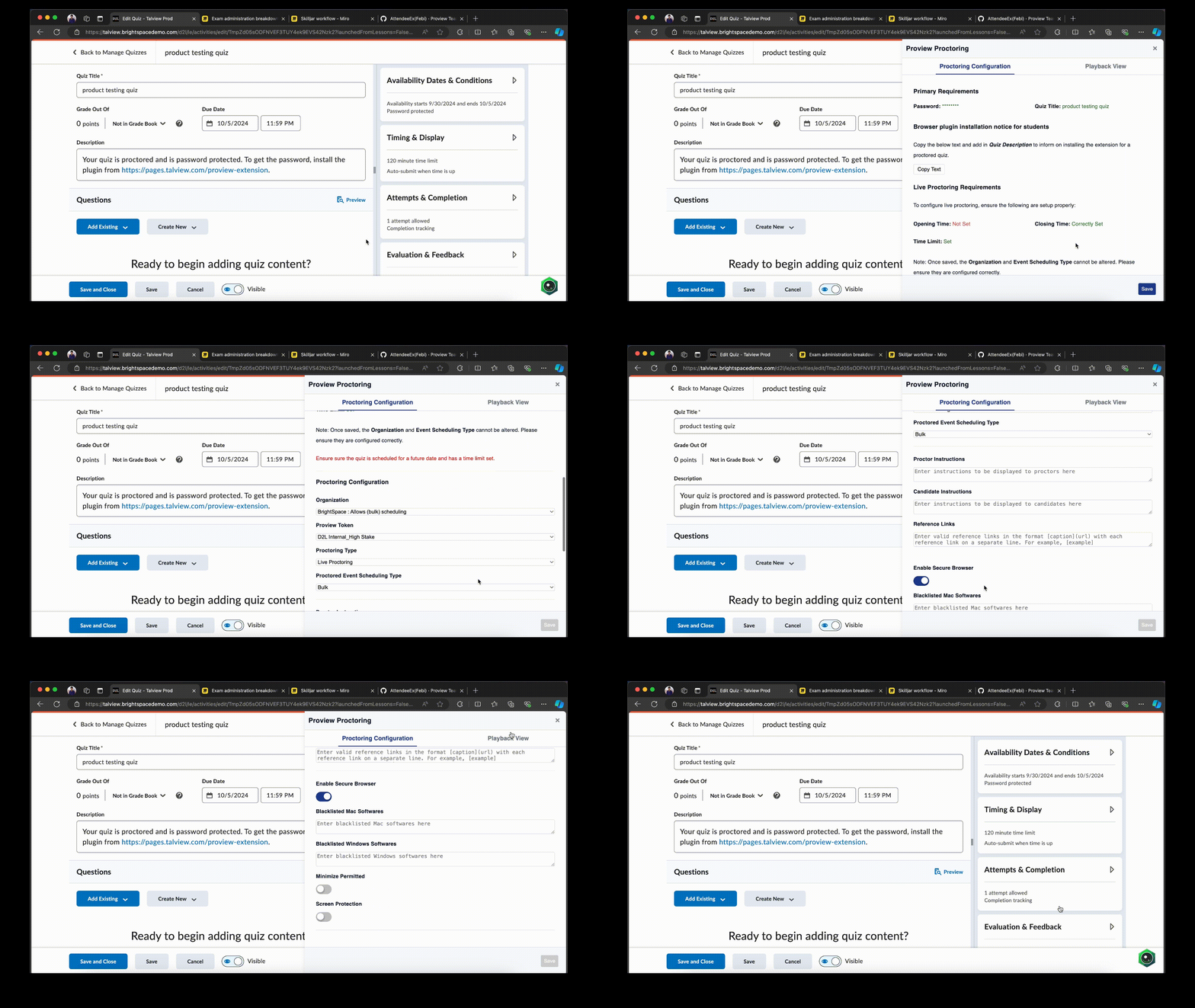
1. **Changes for proctoring configurations and playback view in browser plugin integration (Canvas & D2L LMS)**\
Proctoring and secure browser configurations are now housed within the Proview proctoring icon. Proctoring configurations and playback view are organized into separate tabs within a single side panel.
### Bug Fixes
1. **Wrapper Form – UI issue**
* **Issue:** Long redirect URL would not get truncated.
* **Solution:** The necessary fix has been implemented to truncate long redirect URLs.
2. **Proctor app – UI issue**
* **Issue:** Misalignment in the candidate table.
* **Solution:** The UI has been fixed to correctly align the columns and the data in the table.
3. **Face verification dependent on ID verification setting**
* **Issue:** Disabling the `id_verification_check` setting would prevent face capture from appearing in the approvals section during playback.
* **Solution:** ID and face verification can now be enabled or disabled independently.
***
## Integrations
### Enhancements
1. **Changes for proctoring configurations and playback view in browser plugin integration (Canvas & D2L LMS)**\
Proctoring and secure browser configurations are now housed within the Proview proctoring icon. Proctoring configurations and playback view are organized into separate tabs within a single side panel.
 ***
## Admin Updates
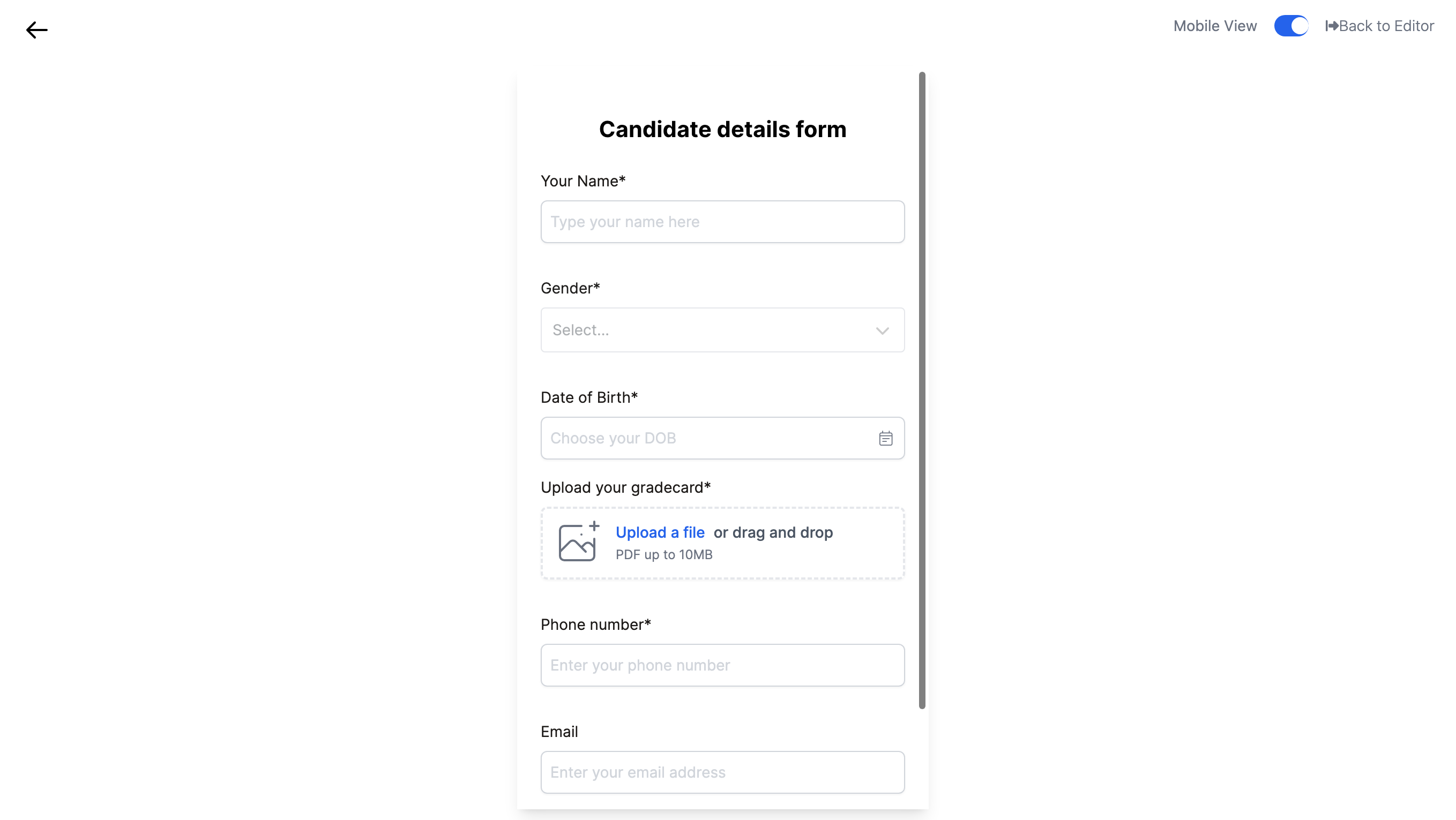
We are excited to announce the launch of our new Form Builder within the admin application. This tool is designed to streamline the creation and management of forms, enabling the admin to build registration, evaluation and consent forms tailored to their organization’s needs
### **Key Features:**
**Form Builder Interface**
* **Block-Based Editor:** Utilize a powerful drag-and-drop interface to add and arrange blocks that represent different input types.
* **Input Field Types:** Include diverse fields in your forms:
* Short Text
* Long Text
* Multiple Choice
* Checkboxes
* Dropdown
* File Upload
* Number
* Email
* Date
***
## Admin Updates
We are excited to announce the launch of our new Form Builder within the admin application. This tool is designed to streamline the creation and management of forms, enabling the admin to build registration, evaluation and consent forms tailored to their organization’s needs
### **Key Features:**
**Form Builder Interface**
* **Block-Based Editor:** Utilize a powerful drag-and-drop interface to add and arrange blocks that represent different input types.
* **Input Field Types:** Include diverse fields in your forms:
* Short Text
* Long Text
* Multiple Choice
* Checkboxes
* Dropdown
* File Upload
* Number
* Email
* Date
 * **Layout Customization:** Organize blocks into 1, 2, or 3 grid layouts, allowing for aesthetic arrangement of form elements.
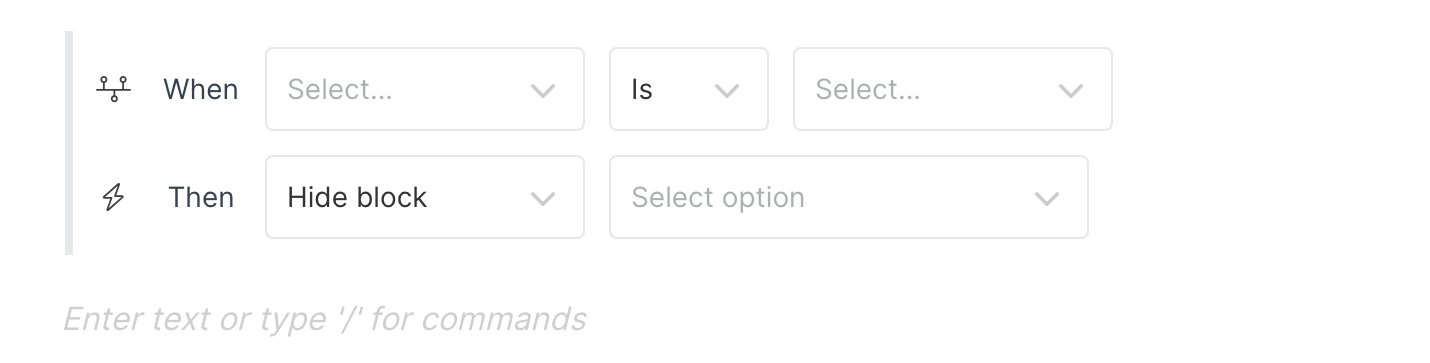
* **Conditional Logic Block:** Enhance form interactivity by showing or hiding certain blocks based on respondents' answers to choice-based input fields. This allows for dynamic forms that adapt to user input, improving respondent experience and data relevance.
* **Layout Customization:** Organize blocks into 1, 2, or 3 grid layouts, allowing for aesthetic arrangement of form elements.
* **Conditional Logic Block:** Enhance form interactivity by showing or hiding certain blocks based on respondents' answers to choice-based input fields. This allows for dynamic forms that adapt to user input, improving respondent experience and data relevance.
 * **Form Preview:** Simulate and test each form created in the builder to see how the form instance will appear to respondents.
**Form Library**
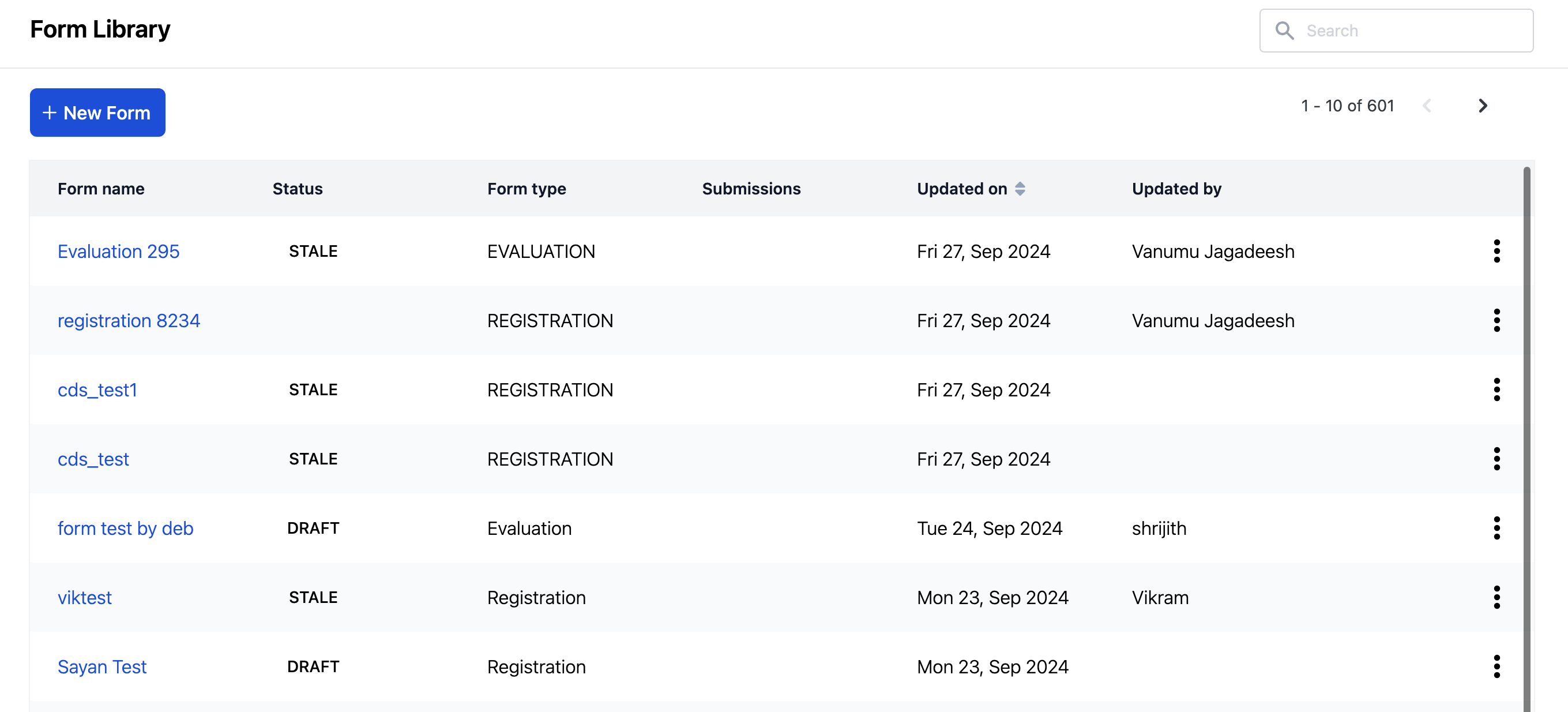
* **Manage Forms:** Access and manage a centralized library of all created forms, enabling easy reuse and modification.
* **Form Preview:** Simulate and test each form created in the builder to see how the form instance will appear to respondents.
**Form Library**
* **Manage Forms:** Access and manage a centralized library of all created forms, enabling easy reuse and modification.
 **Responsive Rendering**
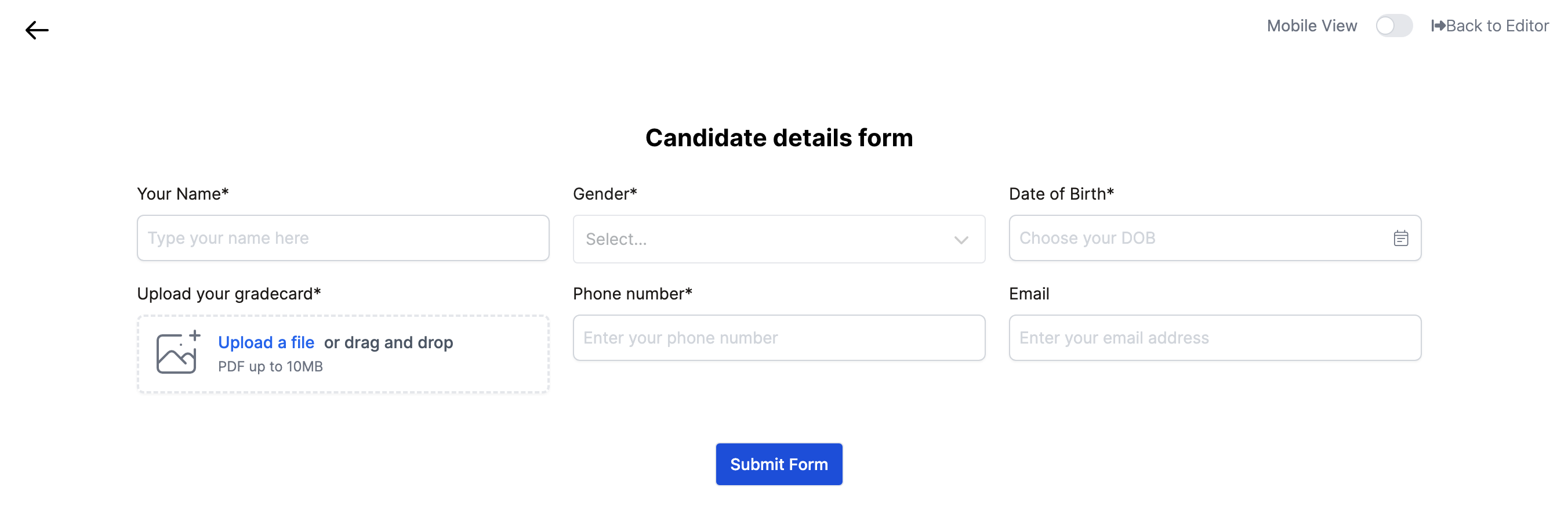
* **Dual View Compatibility:** Forms designed with the Form Builder can be rendered for both web and mobile views. The preview feature allows users to see how forms will appear on both platforms.
* Web view:
**Responsive Rendering**
* **Dual View Compatibility:** Forms designed with the Form Builder can be rendered for both web and mobile views. The preview feature allows users to see how forms will appear on both platforms.
* Web view:
 * Mobile view: