> ## Documentation Index
> Fetch the complete documentation index at: https://docs.talview.com/llms.txt
> Use this file to discover all available pages before exploring further.
# April 2026 Release Updates
The April 2026 release delivers enhancements across **Workflow Tools, Interview Rooms, Assessment Engine & Candidate Experience, and Proctoring**, introducing improved candidate readiness checks, richer interview insights, expanded assessment reporting, and reliability improvements across workflows, sessions, and proctoring.
***
## Workflow Tools Enhancements
This month, we introduced enhancements focused on **improving candidate readiness, platform stability, and scheduling reliability**.
#### 🆕 Feature
**1. System Check Embedded in Candidate Emails**
**Description:** Candidates now see a device and connectivity check prompt embedded directly below the CTA in their Talview emails, guiding them to verify their system setup before an interview or assessment.
**What's New**
* System check prompt rendered below the primary CTA in all candidate email templates.
* Covers browser compatibility, camera, microphone, and network checks.
* No action required from Recruiters - applies automatically to all outgoing emails.
***
#### 🐞 Bug Fixes
1. **Workflow Tools - Platform Stability**
* Evaluator reminder emails not triggering for pending evaluations.
* Candidate invitation emails failing to send after an invite action.
* New notifications not appearing without a page refresh, now appear in real time.
* Unified assessment steps incorrectly marked as "Completed" after the first section.
* Ivy AI total score displaying as 0 in the score side panel.
* Proview index not visible in tabular view and side panel.
* Candidate list not loading for Evaluators.
* Time slab display breaking for slots ending at 12:00 AM.
2. **Scheduler - Payment, Booking & Notification**
* Sessions scheduled despite failed payments.
* Candidates unable to retry after a failed transaction.
* Incorrect redirect from the payment gateway back button.
* Sessions incorrectly scheduled 14 days out.
* Slots not appearing when refreshing the booking page mid-flow.
* Slots incorrectly marked as holidays when another interviewer was available.
* Reminder emails incorrectly triggering for Intelligent Scheduling users.
***
## Proctoring Updates
This month, we introduced enhancements focused on **improved session management, candidate-level actions, and LMS integration upgrades**.
### Attendee Experience (V8)
#### ⚙️ Enhancements
1️⃣ **ID Verification Enhancements** \
**Description:** Improved ID verification now checks for document expiry, date-of-birth anomalies, and validates that the captured ID matches the intended document.
2️⃣ **Consent Data Shown Based on Configurations** \
**Description:** The consent page now shows only relevant Terms and Conditions content based on what is configured, ensuring candidates see accurate information when camera and screen sharing are disabled.
#### 🐞 Bug Fixes
* Disabling microphone was also disabling camera permissions.
* Incidents not triggering consistently.
* Floating widget overlapping exam MCQ sections.
* Camera and audio monitored after session completion.
***
### Center Management (V8)
#### 🆕 Features
**1. Suspend a Candidate's Session** \
**Description:** Proctors can now terminate a candidate's session directly from the monitoring dashboard when a serious violation is detected.
**What's New**
* A reason for suspension must be selected before confirming.
* The candidate is immediately shown a session terminated screen upon suspension.
**2. Add Note to a Candidate's Session** \
**Description:** Proctors can now add internal notes to a candidate's session at any point during onboarding or the exam.
**What's New**
* Notes can be added using the "Add Note" option in the dock.
* Notes are visible only to the proctor and their organisation and can be referenced when reviewing completed sessions.
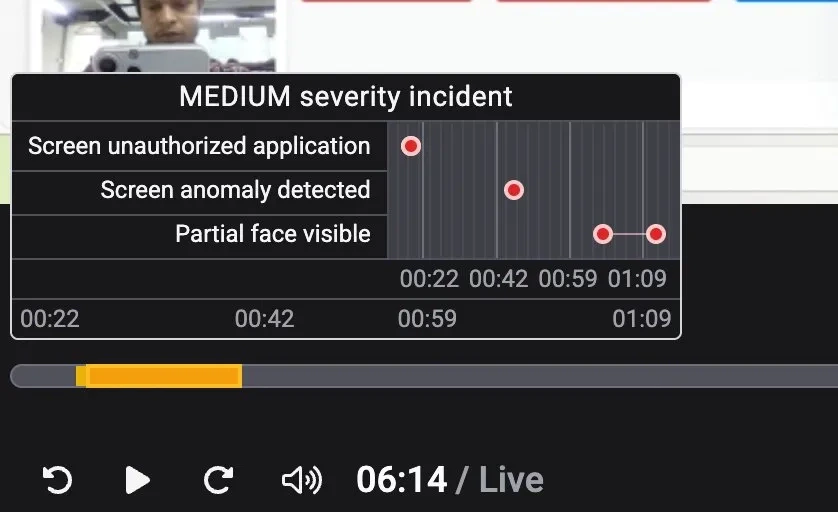
**3. Visualization of Events on Incident Timeline** \
**Description:** Hovering over an incident marker on the session timeline now reveals a pop-up showing all flagged events grouped to form that incident.
**What's New**
* Pop-up shows all events flagged and grouped to form that incident, along with their individual timestamps.
* Helps proctors and reviewers quickly understand what occurred during a suspicious moment without scrubbing through the recording.
 **4. Candidate Session Profile in Center Console** \
**Description:** Center admins can now click on any candidate in the candidate list to view a detailed profile of that candidate's session.
**What's New**
* Shows registration details, check-in information, and captured submissions with match and mismatch indicators.
* Displays a chronological timeline of key events including incidents and exam milestones.
**4. Candidate Session Profile in Center Console** \
**Description:** Center admins can now click on any candidate in the candidate list to view a detailed profile of that candidate's session.
**What's New**
* Shows registration details, check-in information, and captured submissions with match and mismatch indicators.
* Displays a chronological timeline of key events including incidents and exam milestones.
**5. Candidate Level Actions in Center Console** \
**Description:** Center admins can now take candidate-level actions directly from the console.
**What's New**
* **Report Incident:** Center admins can report an incident against a candidate with a description and action taken.
* **Mark Absent:** Center admins can mark a candidate as absent when they fail to show up for their exam.
* **Decline Booking:** Center admins can decline a candidate's exam booking before they have appeared for the exam.
#### ⚙️ Enhancements
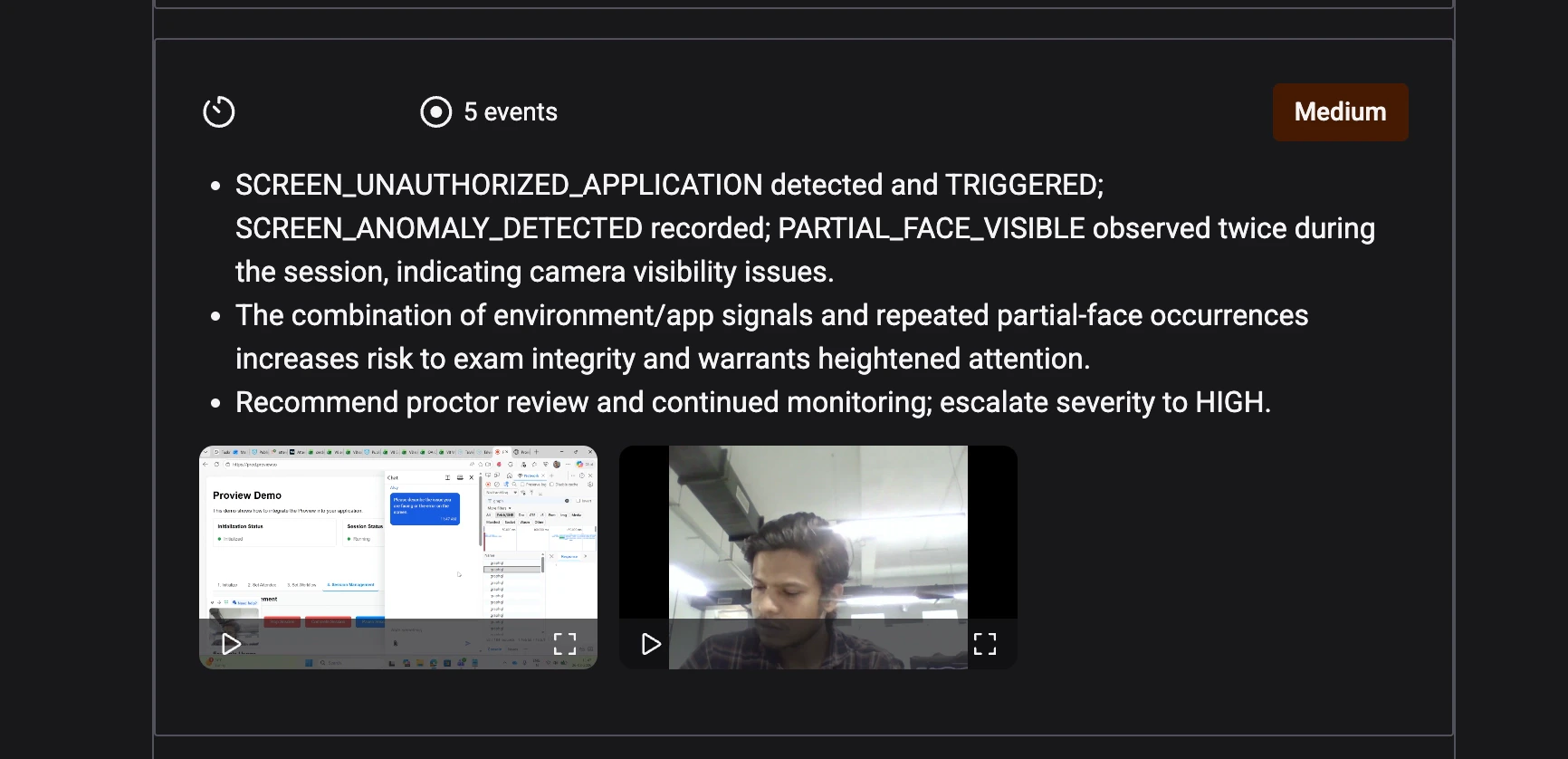
1️⃣ **Video Evidence for Incidents in Summary Report** \
**Description:** Each incident in the session summary report now includes video evidence captured at the time of the incident.
**What's New**
* Reviewers can watch relevant video clips directly within the report.
* Makes it easier to assess incidents without scrubbing through the full session recording.
 #### 🐞 Bug Fixes
* Clicking within an incident region always jumped to the start - now seeks to the exact point clicked.
***
### Integrations (V7+)
#### 🆕 Feature
**Upgraded Moodle LMS to Version 5.1** \
**Description:** Talview now supports Moodle version 5.1, with all proctoring types and secure browser capabilities.
***
## Interview Rooms Enhancements
This month, we introduced enhancements focused on **improving code execution reliability, session recording, and session stability**.
#### ⚙️ Enhancements
1️⃣ **CodeJam - Migrated to Judge0 Execution Engine**\
**Description:** CodeJam code execution now runs on Judge0, replacing the previous JDoodle integration for more reliable and faster results.
2️⃣ **VR Session Recording Report**\
**Description:** A dedicated recording report is now available for Video Room sessions.
***
#### 🐞 Bug Fixes
* Face auth image corrupted in playback, causing incorrect verification status.
* Face auth image broken after completing a live session.
* Candidates stuck on loading screen after face authentication.
* Interviewers intermittently unable to join live sessions.
* CodeJam sync broken for ACS sessions.
* Post-session feedback page stuck loading after leaving a session.
* Incorrect authentication URL redirect when joining a live session.
* Secondary camera feed not visible in portrait mode.
***
## Assessment Engine & Candidate Experience Updates
This month, we focused on **improving the accuracy and reliability of candidate-facing communications**.
#### ⚙️ Enhancements
1️⃣ **Cleaner Assessment Emails** \
**Description:** The "Estimated Duration" field no longer appears in assessment invite and reminder emails when no duration value is configured, ensuring candidates receive accurate communications.
***
#### 🐞 Bug Fixes
* Clicking within an incident region always jumped to the start - now seeks to the exact point clicked.
***
### Integrations (V7+)
#### 🆕 Feature
**Upgraded Moodle LMS to Version 5.1** \
**Description:** Talview now supports Moodle version 5.1, with all proctoring types and secure browser capabilities.
***
## Interview Rooms Enhancements
This month, we introduced enhancements focused on **improving code execution reliability, session recording, and session stability**.
#### ⚙️ Enhancements
1️⃣ **CodeJam - Migrated to Judge0 Execution Engine**\
**Description:** CodeJam code execution now runs on Judge0, replacing the previous JDoodle integration for more reliable and faster results.
2️⃣ **VR Session Recording Report**\
**Description:** A dedicated recording report is now available for Video Room sessions.
***
#### 🐞 Bug Fixes
* Face auth image corrupted in playback, causing incorrect verification status.
* Face auth image broken after completing a live session.
* Candidates stuck on loading screen after face authentication.
* Interviewers intermittently unable to join live sessions.
* CodeJam sync broken for ACS sessions.
* Post-session feedback page stuck loading after leaving a session.
* Incorrect authentication URL redirect when joining a live session.
* Secondary camera feed not visible in portrait mode.
***
## Assessment Engine & Candidate Experience Updates
This month, we focused on **improving the accuracy and reliability of candidate-facing communications**.
#### ⚙️ Enhancements
1️⃣ **Cleaner Assessment Emails** \
**Description:** The "Estimated Duration" field no longer appears in assessment invite and reminder emails when no duration value is configured, ensuring candidates receive accurate communications.
***