> ## Documentation Index
> Fetch the complete documentation index at: https://docs.talview.com/llms.txt
> Use this file to discover all available pages before exploring further.
# May 2025 Release Updates
> Stay updated with the latest features and enhancements rolled out in May 2025 across Talview’s Orchestration Platform (TOP) – including Workflow Tools, Candidate Experience, Interview Rooms, and Proview (Proctoring).
## 🔧 Workflow Tools & Candidate Experience Updates
### **Workflow Tools**
1. **Pre-assessment & Pre-interview forms**
**What’s New:**
Candidates can now fill out pre-assessment or pre-interview forms to submit additional details before their assessments or interviews.
Recruiters and Evaluators can view submitted forms directly in the Workflow Tools platform, ensuring they’re better prepared for interactions. This leads to more informed evaluations.
2. **Interview notification enhancements (Post-Interview Notifications)**
**What’s New:**
Automated notifications are now sent to both candidates and interviewers once an interview concludes. These can include thank-you messages, attendance status, and help maintain engagement post-interview.
**Value Addition:**
Reduces manual follow-ups by recruiters, improves candidate experience, and supports a smoother end-to-end interview lifecycle.
3. **"Running Late" Status Option**
**What’s New:**
Candidates and interviewers now have the option to indicate they are "Running Late" directly from the interview join reminder. Upon selecting this option:
* They are redirected to a page to confirm the delay
* They can add an optional message (e.g., “Stuck in a meeting”)
* The message is instantly shown in the Interview Room UI to the participant who has already joined.
4. **SMS Notifications to candidates and interviewers**
**What’s New:**
SMS notifications can now be automatically triggered to both candidates and interviewers for critical scheduling actions through the **Intelligent Scheduler**, including:
* Scheduling online or in-person interviews
* Rescheduling online or in-person interviews
* Informing a participant when the other has joined
**Value Addition:**
Improves real-time coordination, ensures higher attendance rates, and supports users with limited email access.
5. **Notification Inbox Enhancements**
**View Notification Status**
**What’s New:**
Users can now view the delivery and interaction status of all notifications (Email, SMS) sent through the platform, such as: Delivered, Read, Unsubscribed, Failed etc.
**Value Addition:**
Brings transparency and helps recruiters and admins assess message effectiveness or troubleshoot communication issues.
**Track SMS Sent to Participants**
**What’s New:**
All SMS messages sent to candidates or interviewers - are now logged in the **Notification Inbox**. Users can see full message content, timestamps, and recipient details.
### **Candidate Experience**
1. **Refund invoice**
**What’s New:**
Users receiving a refund now get an **auto-generated invoice** with complete transaction details, including: Refund amount, Transaction ID, Timestamp. The invoice is available in the UI and will be sent via email (*in the next release*).
.png?fit=max&auto=format&n=rh9s8jxNAlYG1m3c&q=85&s=8e7302d326abbd387e3643774fc725fd) 2. **Configure Visibility of Reschedule & Cancel Links**
**What’s New:**
Platform Admins now have granular control over whether **Reschedule** and **Cancel** links are visible to candidates after they book a slot.
**Value Addition:**
Empowers organizations to enforce **stricter scheduling policies** or meet **compliance needs** by restricting post-booking changes when required.
3. **Set Cut-off Time for Slot Reschedule & Cancellation**
**What’s New:**
Admins can now define **cut-off thresholds (in hours)** before a scheduled slot, after which the **Reschedule** and **Cancel** actions will be restricted for candidates.
**Value Addition:**
Enables organizations to reduce **last-minute disruptions**, improve **interviewer preparedness**, and align scheduling flexibility.
4. **Slot Display & Update Before Payment**
**What’s New:**
Candidates in the **Book & Pay** workflow can now:
* **Review** their selected slot
* **Modify** it before proceeding to payment
5. **Proctoring V7+ Integrated with New Test-Taker Experience**
**What’s New:**
**Proctoring V7+** is now seamlessly integrated with the **CX 3.0 test-taking experience**, allowing candidates to:
* **Record and submit** their pre-flight checks
* **Complete assessments smoothly** with fewer disruptions
### **Bug fixes and minor enhancements in the payment flow**
* The refund amount now correctly shows as **zero** when a **100% coupon** is applied.
* **Unavailable dates** are now clearly greyed out in the calendar view.
* Candidates can now **seamlessly complete slot booking** via the *Pay and Book* flow when payment is successful, but booking fails in *Book and Pay* scenarios.
* **The slot order** is now displayed in proper **serial sequence**.
* **Duplicate slots** have been removed; only **unique time slots** are shown.
* **Refund amounts** for rescheduling and cancellations are now **rounded off** to the nearest whole number.
* A **tax disclaimer** is now shown to candidates **before proceeding** with payment - check out the screenshot
* **Refund display issues** in the cancellation flow have been fixed.
* **The browser back button** now works as expected and redirects to the configured **returnURL** in the parent application, if set.
## 🎤 Interview Rooms Updates
1. **360 degree environment check on interviewer request**
* **Description**: Enables interviewers to request a 360-degree environment check for candidates during interviews.
* **Benefits**: Enhances transparency, ensures a distraction-free setting, and improves interview integrity.
### **Interviewer View**
2. **Configure Visibility of Reschedule & Cancel Links**
**What’s New:**
Platform Admins now have granular control over whether **Reschedule** and **Cancel** links are visible to candidates after they book a slot.
**Value Addition:**
Empowers organizations to enforce **stricter scheduling policies** or meet **compliance needs** by restricting post-booking changes when required.
3. **Set Cut-off Time for Slot Reschedule & Cancellation**
**What’s New:**
Admins can now define **cut-off thresholds (in hours)** before a scheduled slot, after which the **Reschedule** and **Cancel** actions will be restricted for candidates.
**Value Addition:**
Enables organizations to reduce **last-minute disruptions**, improve **interviewer preparedness**, and align scheduling flexibility.
4. **Slot Display & Update Before Payment**
**What’s New:**
Candidates in the **Book & Pay** workflow can now:
* **Review** their selected slot
* **Modify** it before proceeding to payment
5. **Proctoring V7+ Integrated with New Test-Taker Experience**
**What’s New:**
**Proctoring V7+** is now seamlessly integrated with the **CX 3.0 test-taking experience**, allowing candidates to:
* **Record and submit** their pre-flight checks
* **Complete assessments smoothly** with fewer disruptions
### **Bug fixes and minor enhancements in the payment flow**
* The refund amount now correctly shows as **zero** when a **100% coupon** is applied.
* **Unavailable dates** are now clearly greyed out in the calendar view.
* Candidates can now **seamlessly complete slot booking** via the *Pay and Book* flow when payment is successful, but booking fails in *Book and Pay* scenarios.
* **The slot order** is now displayed in proper **serial sequence**.
* **Duplicate slots** have been removed; only **unique time slots** are shown.
* **Refund amounts** for rescheduling and cancellations are now **rounded off** to the nearest whole number.
* A **tax disclaimer** is now shown to candidates **before proceeding** with payment - check out the screenshot
* **Refund display issues** in the cancellation flow have been fixed.
* **The browser back button** now works as expected and redirects to the configured **returnURL** in the parent application, if set.
## 🎤 Interview Rooms Updates
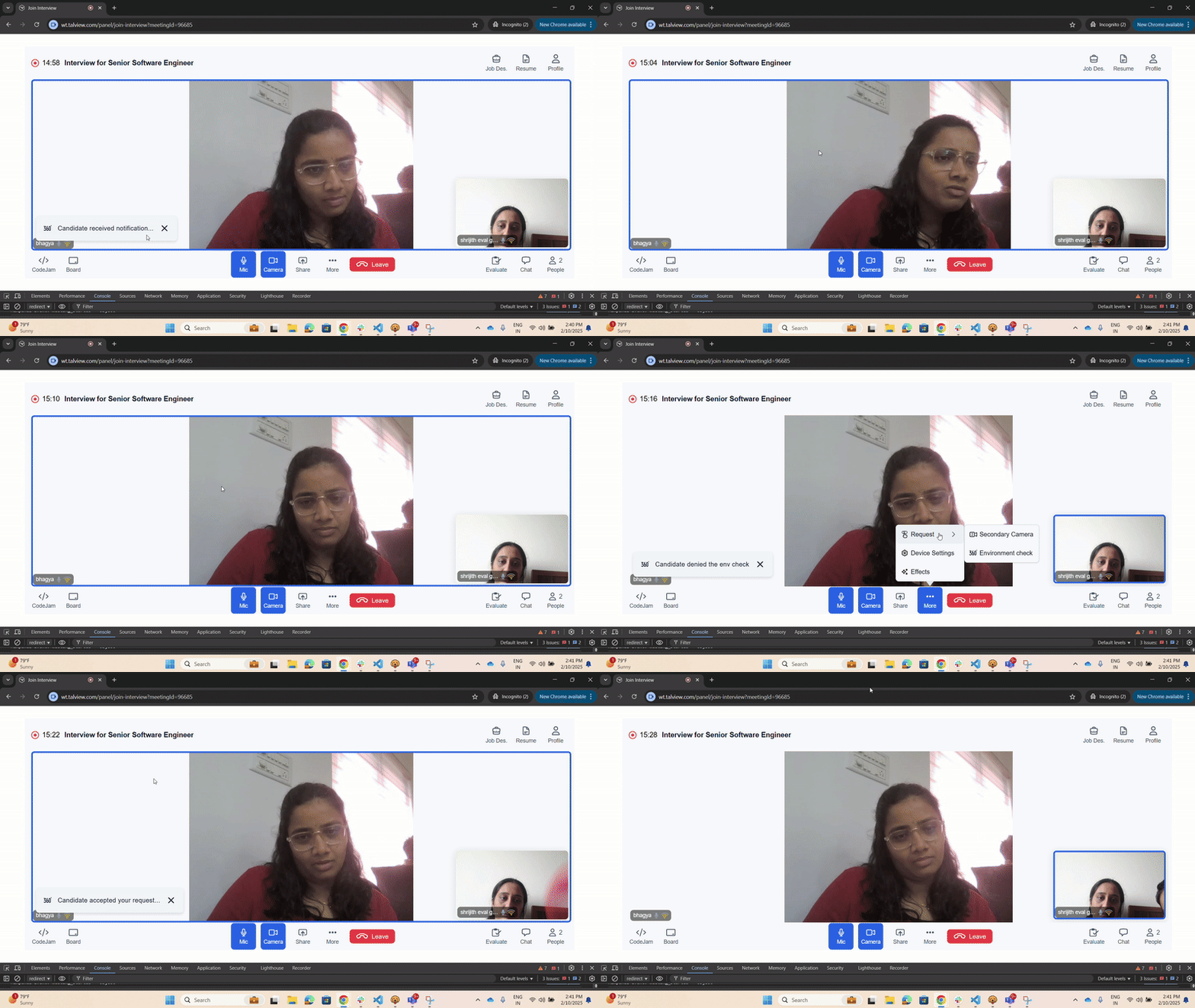
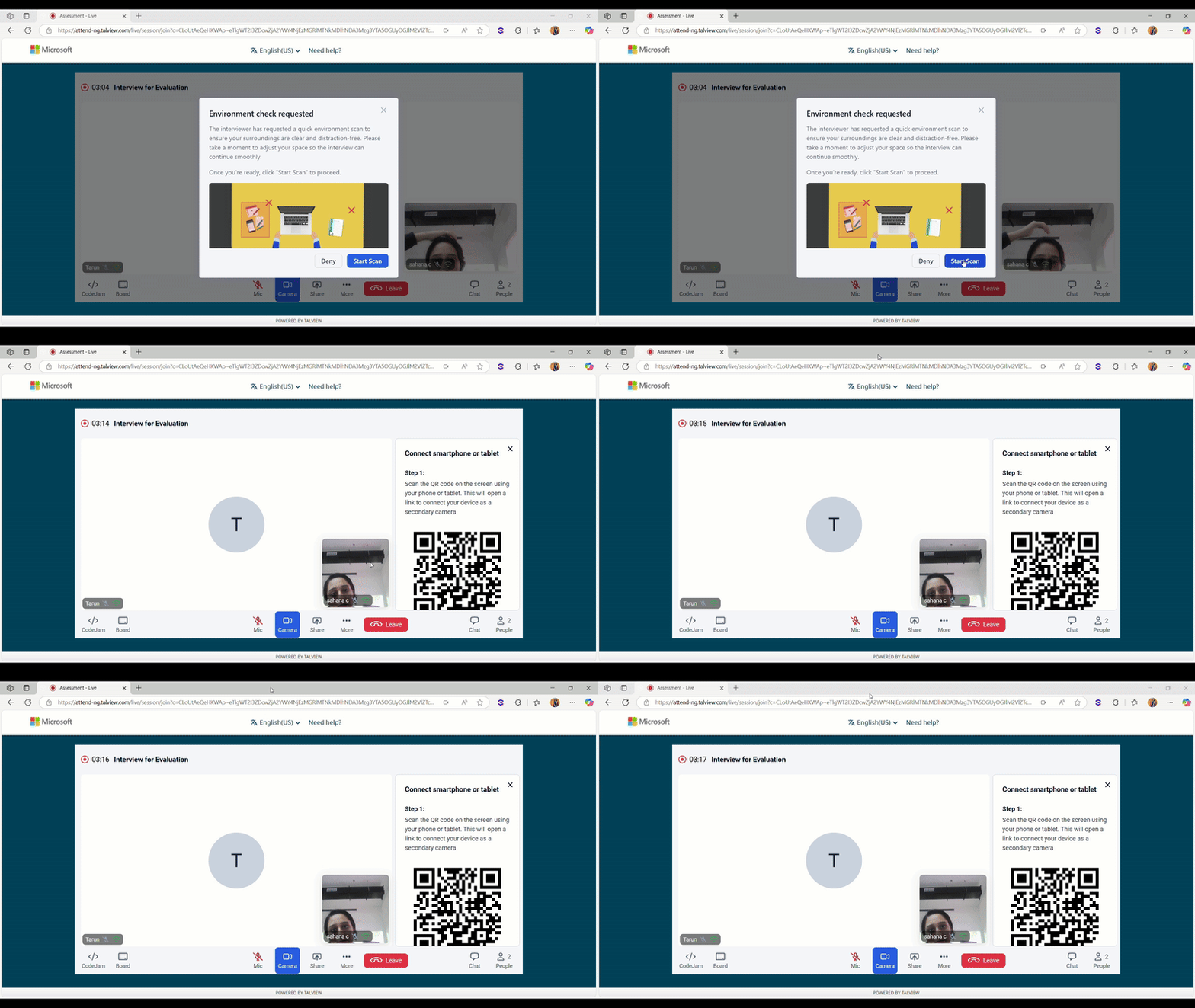
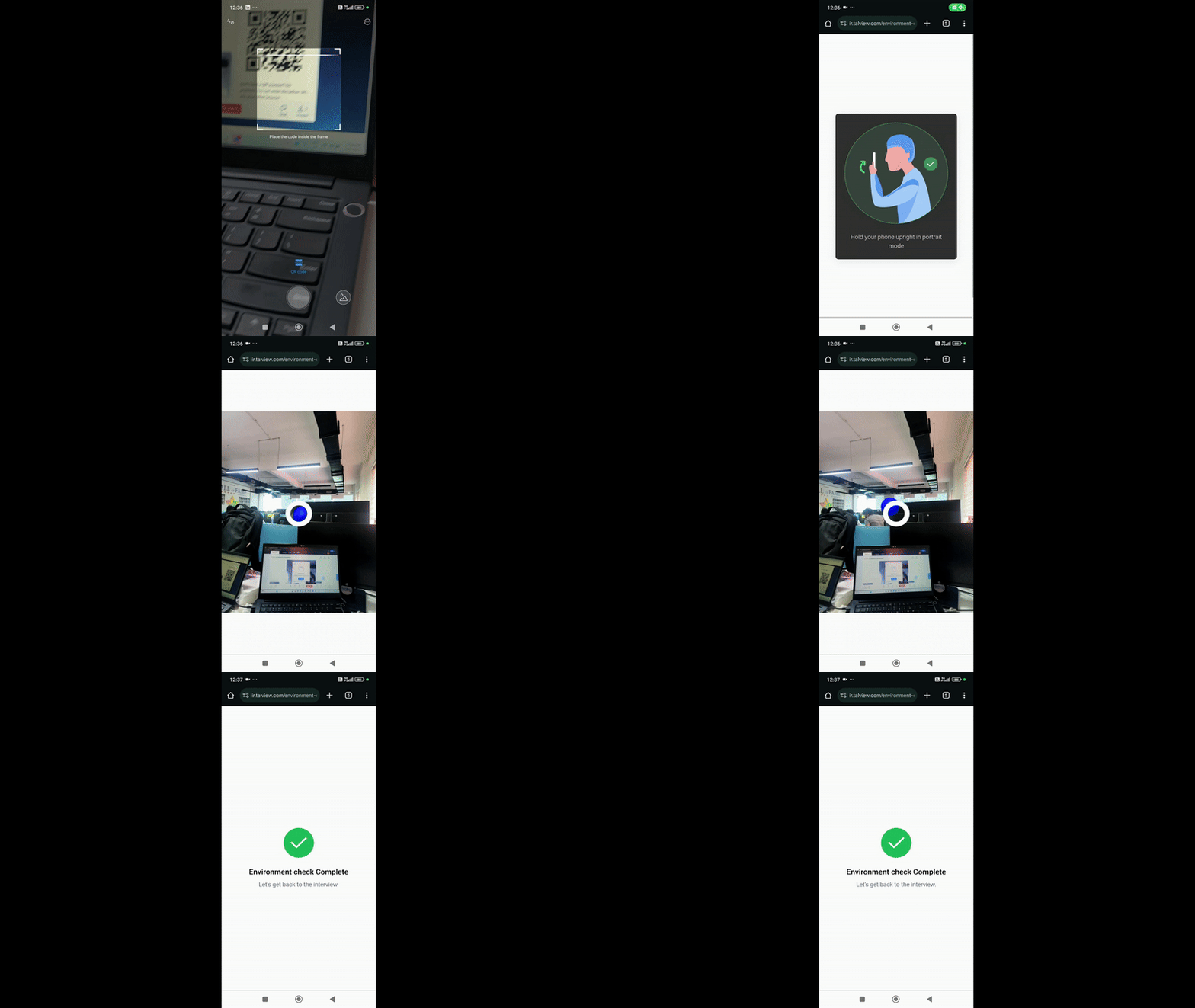
1. **360 degree environment check on interviewer request**
* **Description**: Enables interviewers to request a 360-degree environment check for candidates during interviews.
* **Benefits**: Enhances transparency, ensures a distraction-free setting, and improves interview integrity.
### **Interviewer View**
 ### **Candidate Web View**
 ### **Candidate Mobile View**
 2. **Wait notification- Decline from email status visibility in Interview Rooms**
* **Description**: Introduced support to reflect meeting declines from email directly in the live session view for other participants.
* **Benefits**: Improves visibility into participant availability, helping others manage expectations and reduce wait time during sessions.
3. **Noise Suppression in Interview Rooms**
* **Description**: Enabled noise suppression to automatically filter out background disturbances during live sessions.
* **Benefits**: Delivers clearer audio, minimizes distractions, and enhances overall communication quality for all participants.
4. **Echo Cancellation in Interview Rooms**
* **Description**: Implemented echo cancellation to eliminate audio feedback and echo during live sessions.
* **Benefits**: Ensures smooth, interruption-free conversations with improved audio clarity for all participants.
5. **Sound Notifications on Call disconnection**
* **Description**: Sound notifications alert users when a call gets disconnected.
* **Benefits**:
* Helps users quickly recognize disconnections
* Reducing confusion and enabling faster rejoining or follow-up
### **Bug Fixes**
We have focused on closing the high-priority bugs listed below
* Enabled copy paste in codejam for interviewers
* Fix on generation of guide for IR recruit
* Disabled the evaluate tab for non-registered guest users
## 👥 Proview (Proctoring) Updates
### **Attendee Experience**
* **Broken Logos on Network Disconnection:** Fixed an issue where logos were not displaying correctly if the test taker lost internet connection. Logos now load seamlessly on UI recovery.
* **Alvy AutoPilot Mode:** Alvy can now fully manage live proctored sessions autonomously—handling ID checks, environment scans, behavior monitoring, issuing warnings, and generating summaries - without a human proctor.
### **Proctor NG**
* **Pre-Flight Pause Disabled:** The pause option is now disabled during pre-flight checks and only becomes available once the test begins.
* **Secondary Camera Reconnection Indicator:** When a candidate’s secondary camera disconnects, a "Reconnecting" label is now shown on the proctor’s view for better visibility.
### **Proview Console (V8)**
* **Coordinator Transactions Report:** Coordinators can now view and export financial transaction data related to assessments directly from the dashboard. Fields include transaction ID, candidate email, status, and date.
* **Voucher Management Improvements:**
* SKU selection is now mandatory when creating vouchers.
* External workflow IDs are shown alongside names to reduce confusion in case of duplicates.
### **Integrations (V7+)**
* **Canvas & D2L:** Passwords are auto-injected into secure browser (SB) sessions, preventing access via dev tools and ensuring secure quiz entry.
* **Cornerstone LMS – Multi-Attempt Support:** Admins can now configure up to 6 attempts per quiz using the LMS dashboard.
* **Thinkific LMS – In-Quiz Alert Display:** Candidates now receive real-time alerts like “Face Not Detected” or “Multiple People Detected” directly in their quiz tab.
* **CSOD – Post-Quiz Candidate Data in Console:** Candidate details (name, ID, session data) are now shown in the Proview Console after both AI proctored and R\&R quizzes.
* **LMS Dashboard – Rich Text in Instructions:** Instruction fields now support rich text formatting, including bold, italics, bullet lists, and hyperlinks.
### **Alvy**
* **Alvy on AutoPilot Mode:** Alvy now manages full proctored sessions without proctor involvement.
* **Alvy Screen Monitoring Fix:** Improved Alvy to ignore inactive or Talview-required apps during screen monitoring.
2. **Wait notification- Decline from email status visibility in Interview Rooms**
* **Description**: Introduced support to reflect meeting declines from email directly in the live session view for other participants.
* **Benefits**: Improves visibility into participant availability, helping others manage expectations and reduce wait time during sessions.
3. **Noise Suppression in Interview Rooms**
* **Description**: Enabled noise suppression to automatically filter out background disturbances during live sessions.
* **Benefits**: Delivers clearer audio, minimizes distractions, and enhances overall communication quality for all participants.
4. **Echo Cancellation in Interview Rooms**
* **Description**: Implemented echo cancellation to eliminate audio feedback and echo during live sessions.
* **Benefits**: Ensures smooth, interruption-free conversations with improved audio clarity for all participants.
5. **Sound Notifications on Call disconnection**
* **Description**: Sound notifications alert users when a call gets disconnected.
* **Benefits**:
* Helps users quickly recognize disconnections
* Reducing confusion and enabling faster rejoining or follow-up
### **Bug Fixes**
We have focused on closing the high-priority bugs listed below
* Enabled copy paste in codejam for interviewers
* Fix on generation of guide for IR recruit
* Disabled the evaluate tab for non-registered guest users
## 👥 Proview (Proctoring) Updates
### **Attendee Experience**
* **Broken Logos on Network Disconnection:** Fixed an issue where logos were not displaying correctly if the test taker lost internet connection. Logos now load seamlessly on UI recovery.
* **Alvy AutoPilot Mode:** Alvy can now fully manage live proctored sessions autonomously—handling ID checks, environment scans, behavior monitoring, issuing warnings, and generating summaries - without a human proctor.
### **Proctor NG**
* **Pre-Flight Pause Disabled:** The pause option is now disabled during pre-flight checks and only becomes available once the test begins.
* **Secondary Camera Reconnection Indicator:** When a candidate’s secondary camera disconnects, a "Reconnecting" label is now shown on the proctor’s view for better visibility.
### **Proview Console (V8)**
* **Coordinator Transactions Report:** Coordinators can now view and export financial transaction data related to assessments directly from the dashboard. Fields include transaction ID, candidate email, status, and date.
* **Voucher Management Improvements:**
* SKU selection is now mandatory when creating vouchers.
* External workflow IDs are shown alongside names to reduce confusion in case of duplicates.
### **Integrations (V7+)**
* **Canvas & D2L:** Passwords are auto-injected into secure browser (SB) sessions, preventing access via dev tools and ensuring secure quiz entry.
* **Cornerstone LMS – Multi-Attempt Support:** Admins can now configure up to 6 attempts per quiz using the LMS dashboard.
* **Thinkific LMS – In-Quiz Alert Display:** Candidates now receive real-time alerts like “Face Not Detected” or “Multiple People Detected” directly in their quiz tab.
* **CSOD – Post-Quiz Candidate Data in Console:** Candidate details (name, ID, session data) are now shown in the Proview Console after both AI proctored and R\&R quizzes.
* **LMS Dashboard – Rich Text in Instructions:** Instruction fields now support rich text formatting, including bold, italics, bullet lists, and hyperlinks.
### **Alvy**
* **Alvy on AutoPilot Mode:** Alvy now manages full proctored sessions without proctor involvement.
* **Alvy Screen Monitoring Fix:** Improved Alvy to ignore inactive or Talview-required apps during screen monitoring.