> ## Documentation Index
> Fetch the complete documentation index at: https://docs.talview.com/llms.txt
> Use this file to discover all available pages before exploring further.
# How am I notified when multiple faces are detected during a Live interview
During a Live Interview, the platform continuously performs real-time face detection. If more than one face is detected in the candidate’s camera frame, the system flags the event and surfaces a notification to the evaluator immediately.
This ensures interview integrity and helps you take appropriate action in real time. In this article, you will learn how you are notified when multiple faces are detected and what steps you should take in response.
***
## How the Notification Appears
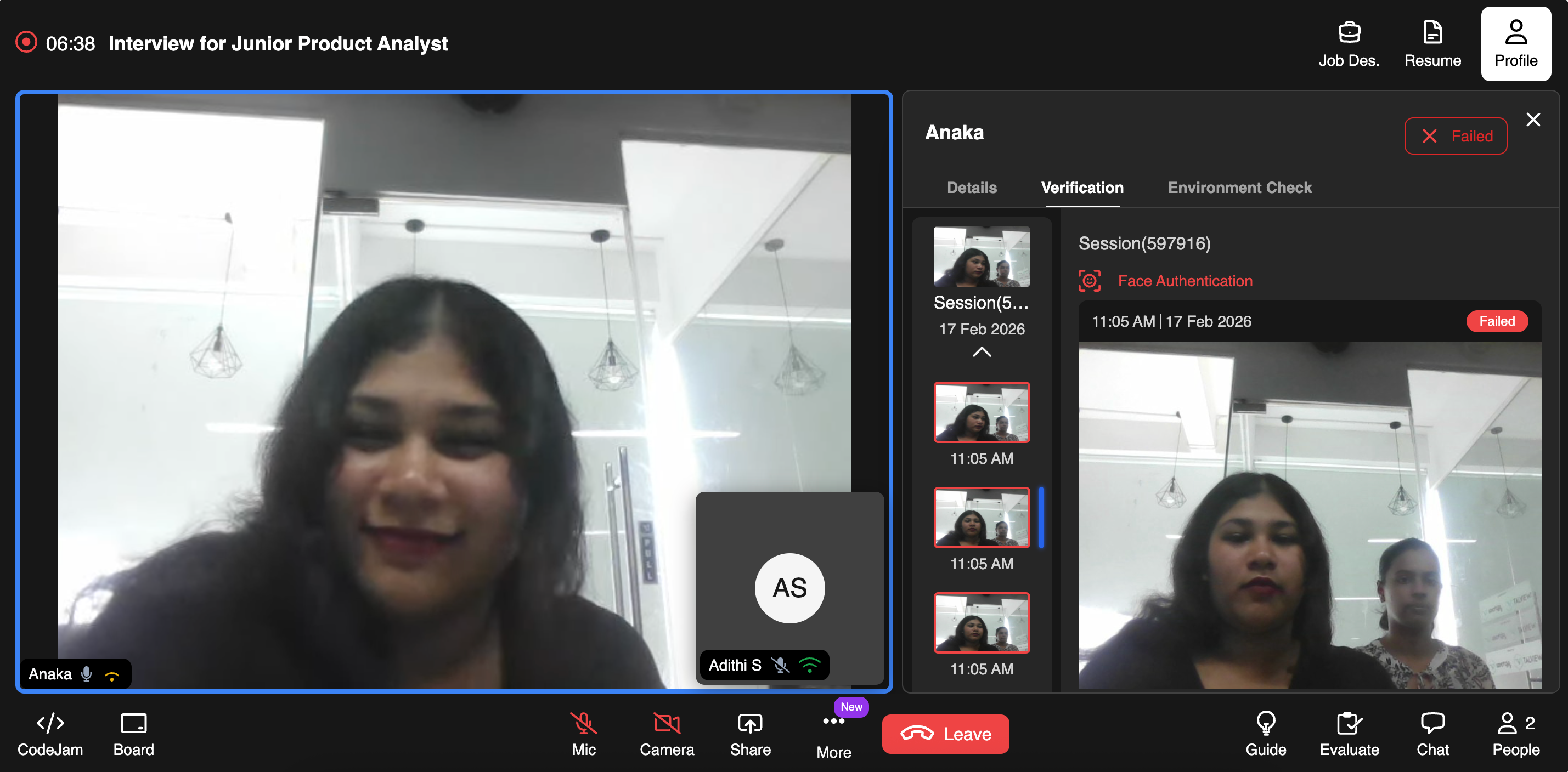 ### Real-Time Flag in the Verification Panel
* Navigate to the **Profile** section during a Live interview.
* Open the **Verification** tab.
* Under the active **Session**, you will see:
* A red status indicator.
* A label such as **Face Authentication – Failed** (if verification fails due to multiple faces).
* A timestamp of when the the event is occured
This is visible in the right-side panel during the session.
***
## What Should You Do If Multiple Faces Are Detected
As an Evaluator, you may:
* Politely ask the candidate to adjust their camera.
* Request that no one else remain in the room.
* Pause the interview if needed.
* Escalate to your internal compliance or hiring operations team.
* Mark the session for review.
Your organization’s proctoring policy should define the required action.
### Important Notes
* Detection is automated and runs continuously during the session.
* Not every detection results in session failure (severity depends on system rules and policy configuration).
* All flagged instances are logged for audit purposes.
***
### Real-Time Flag in the Verification Panel
* Navigate to the **Profile** section during a Live interview.
* Open the **Verification** tab.
* Under the active **Session**, you will see:
* A red status indicator.
* A label such as **Face Authentication – Failed** (if verification fails due to multiple faces).
* A timestamp of when the the event is occured
This is visible in the right-side panel during the session.
***
## What Should You Do If Multiple Faces Are Detected
As an Evaluator, you may:
* Politely ask the candidate to adjust their camera.
* Request that no one else remain in the room.
* Pause the interview if needed.
* Escalate to your internal compliance or hiring operations team.
* Mark the session for review.
Your organization’s proctoring policy should define the required action.
### Important Notes
* Detection is automated and runs continuously during the session.
* Not every detection results in session failure (severity depends on system rules and policy configuration).
* All flagged instances are logged for audit purposes.
***