> ## Documentation Index
> Fetch the complete documentation index at: https://docs.talview.com/llms.txt
> Use this file to discover all available pages before exploring further.
# Understanding the Candidate profile
The **Candidate Profile** provides detailed information about a candidate participating in a session. It helps proctors quickly review the candidate’s identity, exam details, check-in information, and any incidents reported during the session.
You can access the candidate profile from the **Candidate Management** view by either **clicking the candidate’s name** or selecting **View Profile** from the **menu (three-dot icon)** next to the candidate.
***
### Information Available in the Candidate Profile
The candidate profile contains several sections that provide important session-related details.
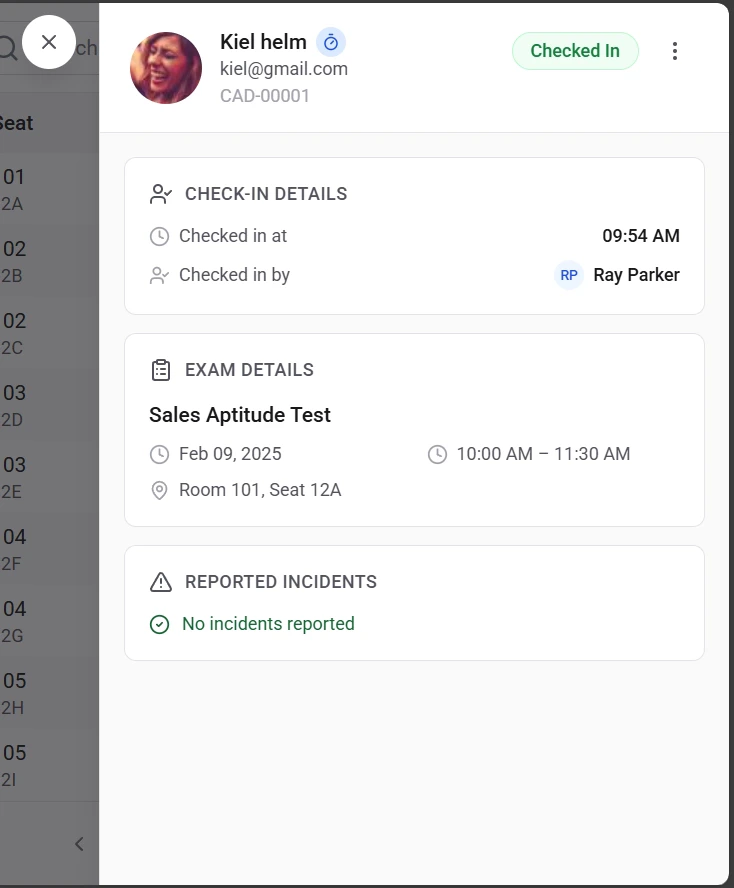 * **Candidate Information**
This section displays the basic details of the candidate, such as:
* **Candidate name**
* **Email address**
* **Candidate ID**
These details help confirm the identity of the candidate assigned to the session.
* **Check-In Details**
This section shows information related to the candidate’s check-in, including:
* **Check-in time**
* **Name of the proctor who performed the check-in**
This helps track when and by whom the candidate was admitted into the session.
* **Exam Details**
This section provides information about the exam assigned to the candidate, such as:
* **Exam name**
* **Session date**
* **Session time**
* **Assigned room**
* **Seat assignment**
These details help ensure that the candidate is scheduled for the correct exam and location.
**Incident Records**
The profile also displays any **incidents reported during the session**.
If no incidents have been recorded, the section will display **No incidents reported**.
**Face Authentication**
The profile displays the face authentication captured, which can be used as an identification factor for the candidate.
**Key Benefits of the Candidate Profile**
The candidate profile allows proctors to:
* Verify **candidate and exam information**
* Review **check-in activity**
* Monitor **reported incidents**
* Access key session details quickly while managing the session
Having all this information in one place helps proctors manage candidates efficiently during the exam session.
***
* **Candidate Information**
This section displays the basic details of the candidate, such as:
* **Candidate name**
* **Email address**
* **Candidate ID**
These details help confirm the identity of the candidate assigned to the session.
* **Check-In Details**
This section shows information related to the candidate’s check-in, including:
* **Check-in time**
* **Name of the proctor who performed the check-in**
This helps track when and by whom the candidate was admitted into the session.
* **Exam Details**
This section provides information about the exam assigned to the candidate, such as:
* **Exam name**
* **Session date**
* **Session time**
* **Assigned room**
* **Seat assignment**
These details help ensure that the candidate is scheduled for the correct exam and location.
**Incident Records**
The profile also displays any **incidents reported during the session**.
If no incidents have been recorded, the section will display **No incidents reported**.
**Face Authentication**
The profile displays the face authentication captured, which can be used as an identification factor for the candidate.
**Key Benefits of the Candidate Profile**
The candidate profile allows proctors to:
* Verify **candidate and exam information**
* Review **check-in activity**
* Monitor **reported incidents**
* Access key session details quickly while managing the session
Having all this information in one place helps proctors manage candidates efficiently during the exam session.
***